Filament nestedset tree builder powered by kalnoy/nestedset with Filament v4 and v5 support
wsmallnews/filament-nestedset is a Laravel package for filament nestedset tree builder powered by kalnoy/nestedset with filament v4 and v5 support.
It currently has 22 GitHub stars and 12.222 downloads on Packagist (latest version v3.0.1).
Install it with composer require wsmallnews/filament-nestedset.
Discover more Laravel packages by wsmallnews
or browse all Laravel packages to compare alternatives.
Last updated




Supports Filament v4 and v5. If you are currently using Filament v3, please refer to this link here
Filament nestedset tree build on kalnoy/nestedset, support multi language. support Multi-tenancy
The package uses a Page + Widget + Livewire Component architecture pattern:
Wsmallnews\FilamentNestedset\Filament\Pages\NestedsetPage) — Abstract Filament Page class. It owns static configuration, schema hooks, nestedset actions, scoped queries, and the default Filament page view.Wsmallnews\FilamentNestedset\Filament\Pages\Widgets\Nestedset) — Abstract Filament widget extending Filament\Widgets\Widget. It uses the same InteractsWithNestedset behavior and can be embedded in custom Filament pages.Wsmallnews\FilamentNestedset\Livewire\Components\Nestedset) — Read-only tree display component extending Livewire\Component for frontend pages.The default NestedsetPage renders the tree from its own view and handles CRUD, drag sorting, delete guards, scoped queries, and repair actions through InteractsWithNestedset and HasNestedsetActions.
| Class | Namespace | Base Class | Purpose |
| --------------------------- | ---------------------------------------------------------------- | -------------------- | ----------------------------------------- |
| Filament Page | Wsmallnews\FilamentNestedset\Filament\Pages\NestedsetPage | Filament\Pages\Page | Full CRUD management in Filament panel |
| Filament Panel Widget | Wsmallnews\FilamentNestedset\Filament\Pages\Widgets\Nestedset | Filament\Widgets\Widget | Embeddable Filament tree widget |
| Frontend Livewire Component | Wsmallnews\FilamentNestedset\Livewire\Components\Nestedset | Livewire\Component | Read-only tree display for frontend pages |
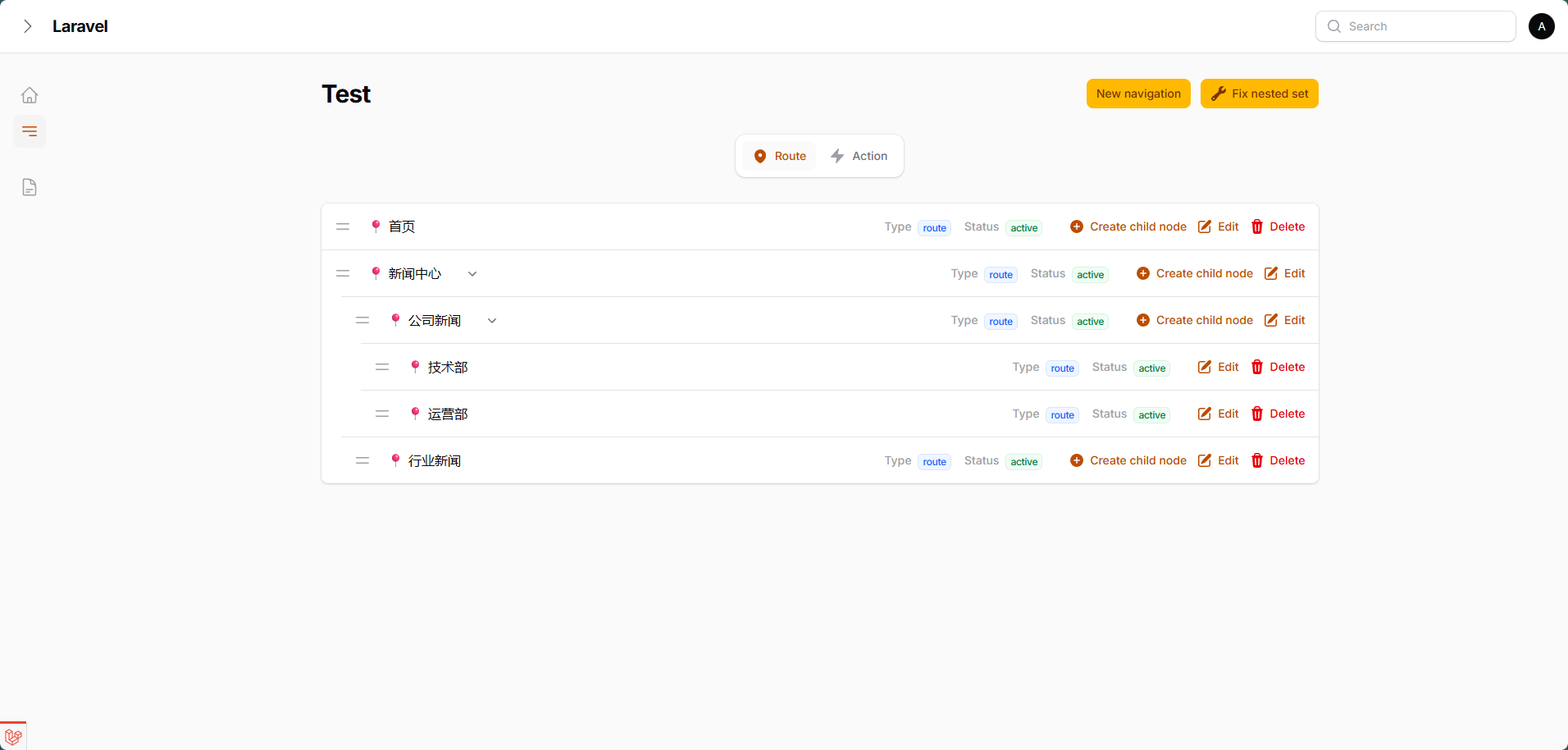
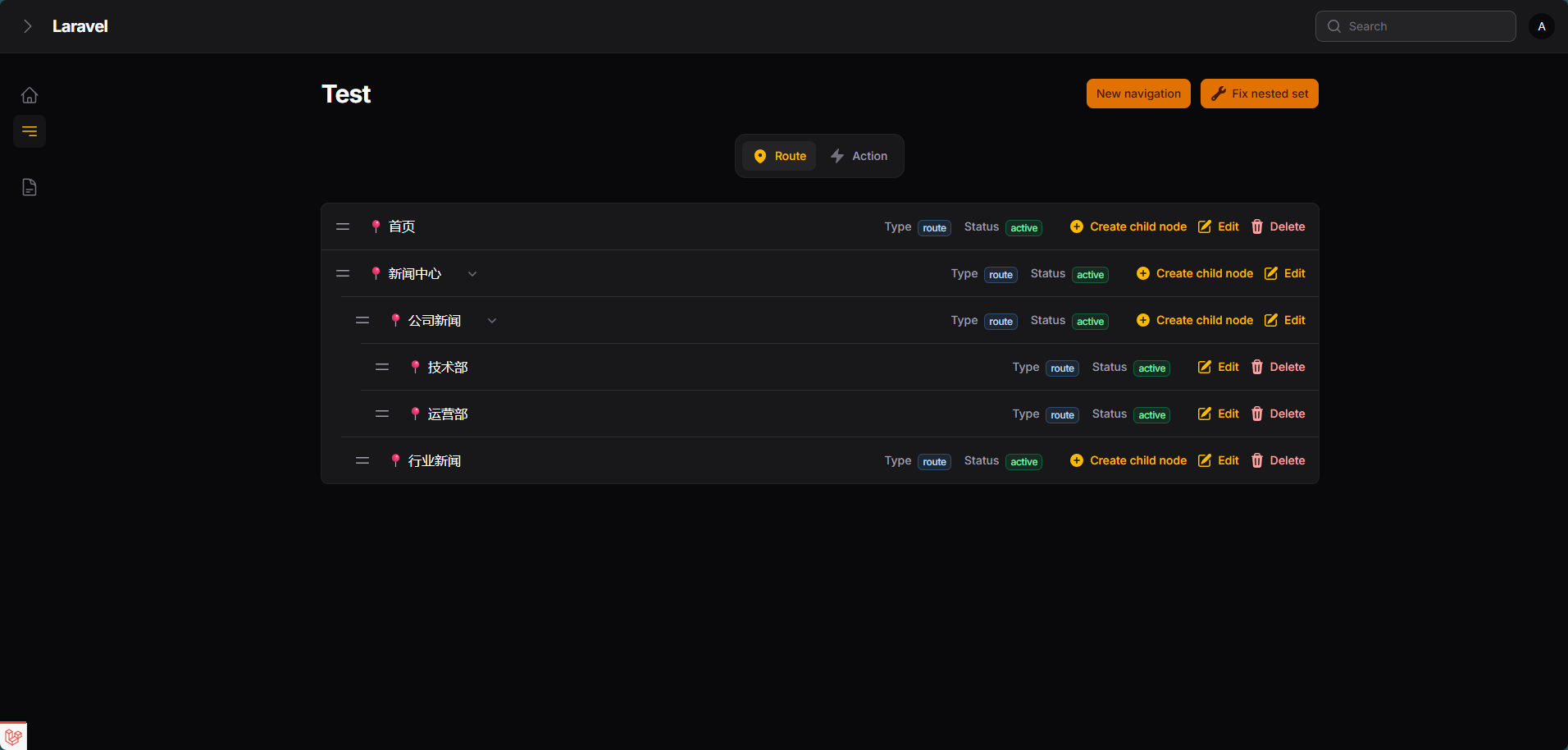
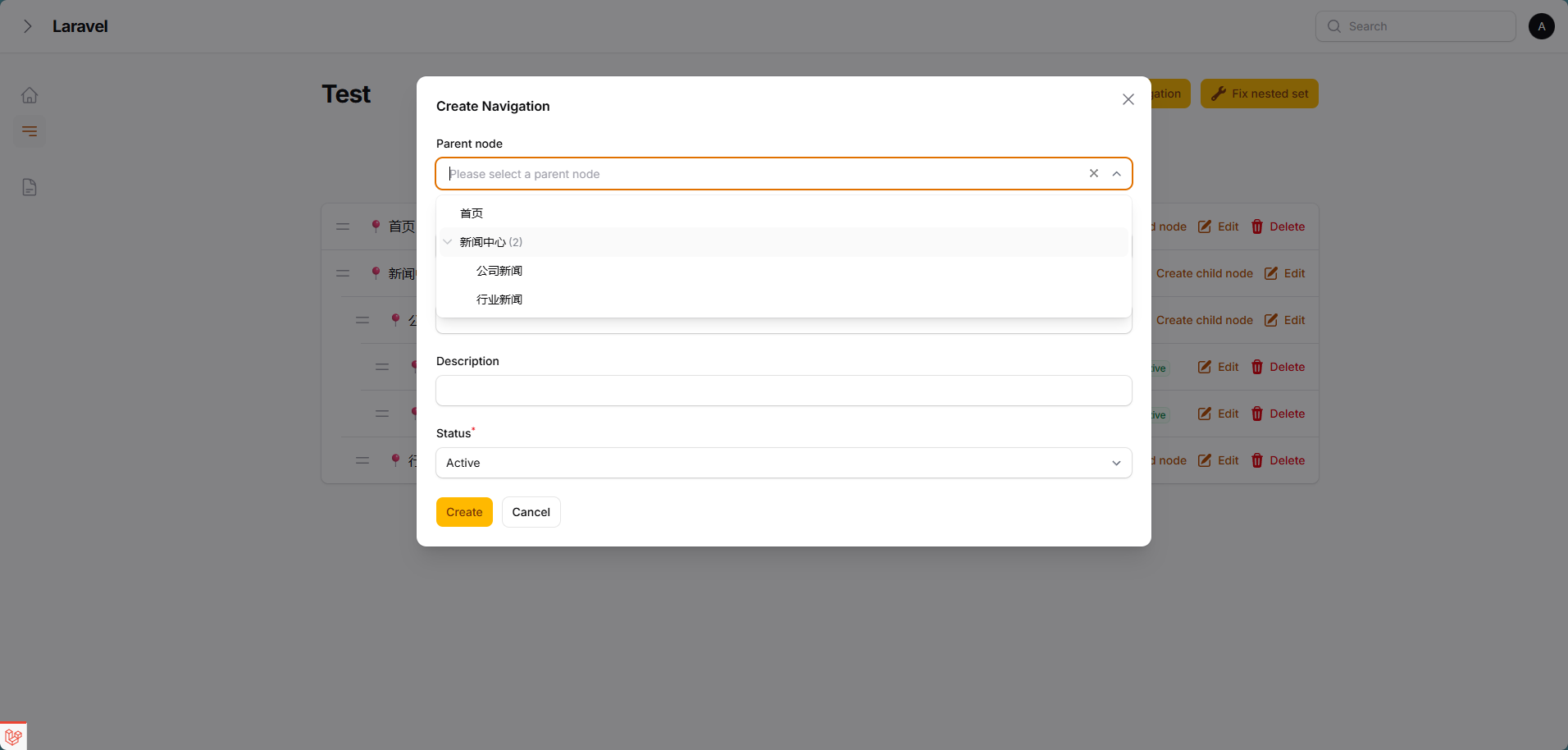
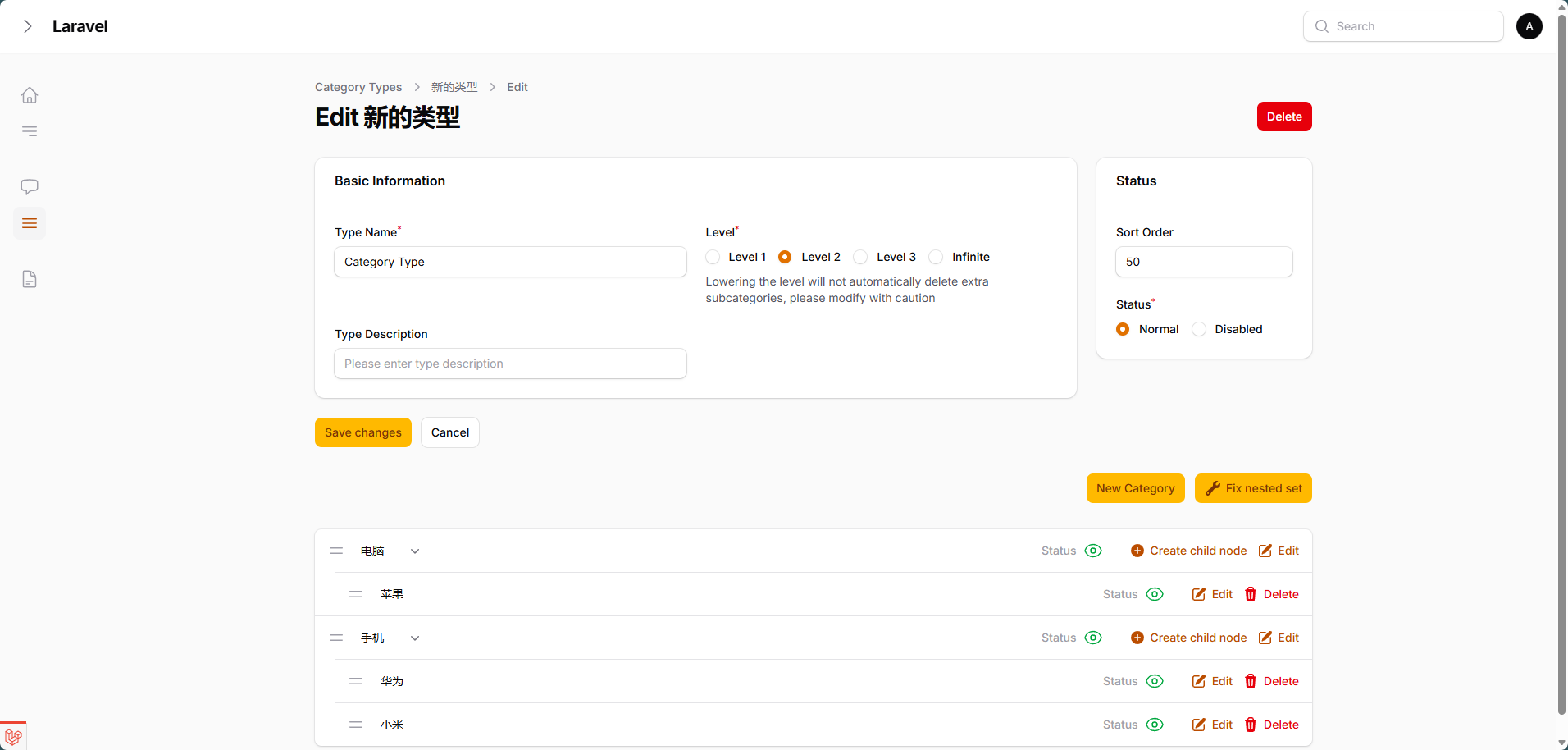
This package ships Laravel Boost AI Guidelines in resources/boost/guidelines/core.blade.php.
Install or enable Laravel Boost in your application, then refresh Boost resources so this package's guidelines are discovered and added to the project overview:
php artisan boost:update --discover
Boost updates the root boost.json and CLAUDE.md automatically. Check those files after running the command to confirm wsmallnews/filament-nestedset is included.
You can install the package via composer:
composer require wsmallnews/filament-nestedset:^3.0
The current release is compatible with both Filament v4 and v5.
You can publish the config file with:
php artisan vendor:publish --tag="sn-filament-nestedset-config"
Optionally, you can publish the views using
php artisan vendor:publish --tag="sn-filament-nestedset-views"
Multi language support, you can publish the language files using
php artisan vendor:publish --tag="sn-filament-nestedset-translations"
This is the contents of the published config file:
return [
    /**
     * Restrict deletion of nodes with children
     */
    'allow_delete_parent' => false,

    /*
     * Restrict deletion of root nodes, even if 'allow_delete_parent' is true, root nodes can be deleted.
     */
    'allow_delete_root' => false,

    /**
     * create action show parent select field
     */
    'create_action_modal_show_parent_select' => true,

    /**
     * Display the "Create Child Node" action in each row (if 'create_action_modal_show_parent_select' is false, This field should be set to true)
     */
    'show_create_child_node_action_in_row' => true,

    /**
     * By default, the CSS file will be automatically loaded globally. If you use a filament custom theme, you can disable the automatic loading of the CSS file
     */
    'autoload_assets' => true,
];
<?php

namespace App\Models;

use Illuminate\Database\Eloquent\Model;
use Kalnoy\Nestedset\NodeTrait;
...

class YouModel extends Model
{
    use NodeTrait;

    ...
}
You should add fields to your model. replacing your_model_table with the name of your model table
Add fields in the new model
<?php

use Illuminate\Database\Migrations\Migration;
use Illuminate\Database\Schema\Blueprint;
use Illuminate\Support\Facades\Schema;

return new class extends Migration
{
    public function up(): void
    {
        Schema::create('your_model_table', function (Blueprint $table) {
            ...
            $table->nestedSet();
            ...
        });
    }
};
Add fields to an existing model
<?php

use Illuminate\Database\Migrations\Migration;
use Illuminate\Database\Schema\Blueprint;
use Illuminate\Support\Facades\Schema;

return new class extends Migration
{
    public function up(): void
    {
        Schema::table('your_model_table', function (Blueprint $table) {
            $table->nestedSet();
        });
    }
};
And run the migration
php artisan migrate
php artisan make:filament-nestedset-page
<?php

namespace App\Filament\Pages;

use Wsmallnews\FilamentNestedset\Filament\Pages\NestedsetPage;

class Test extends NestedsetPage
{
    ...

    protected static string $recordTitleAttribute = 'name';
    ...

}
By default, the plugin will use the recordTitleAttribute attribute to display the node name in the tree. If you want to use another attribute, you can define the getRecordLabel method, Support HtmlString.
<?php

namespace App\Filament\Pages;

use Illuminate\Database\Eloquent\Model;
use Illuminate\Support\HtmlString;
use Wsmallnews\FilamentNestedset\Filament\Pages\NestedsetPage;

class Test extends NestedsetPage
{
    ...

    public function getRecordLabel(Model $item): HtmlString | string
    {
        return $item->{static::getRecordTitleAttribute()} ?? ' ';
    }
    ...
}
If the schema for create and edit are the same, you can define the schema method.
<?php

namespace App\Filament\Pages;

use Wsmallnews\FilamentNestedset\Filament\Pages\NestedsetPage;

class Test extends NestedsetPage
{
    ...

    protected function schema(array $arguments): array
    {
        return [
            //
        ];
    }
    ...
}
If the schema for create and edit are different, you can define createSchema and editSchema methods separately.
<?php

namespace App\Filament\Pages;

use Wsmallnews\FilamentNestedset\Filament\Pages\NestedsetPage;

class Test extends NestedsetPage
{
    ...

    protected function createSchema(array $arguments): array
    {
        return [
            //
        ];
    }
    protected function editSchema(array $arguments): array
    {
        return [
            //
        ];
    }

    ...
}
<?php

namespace App\Filament\Pages;

use Wsmallnews\FilamentNestedset\Filament\Pages\NestedsetPage;

class Test extends NestedsetPage
{
    ...

    protected static ?string $emptyLabel = 'no test data';

    protected static ?string $emptyTipLabel = 'no test data available';

    ...

}
Nestedset level is unlimited by default, you can limit the nestedset levels by:
<?php

namespace App\Filament\Pages;

use Wsmallnews\FilamentNestedset\Filament\Pages\NestedsetPage;

class Test extends NestedsetPage
{
    ...

    protected static ?int $level = 3;

    // Alternatively, you may use the getLevel() to define a dynamic level

    public static function getLevel(): ?int
    {
        return static::$level;
    }

    ...

}
<?php

namespace App\Filament\Pages;

use Wsmallnews\FilamentNestedset\Filament\Pages\NestedsetPage;

class Test extends NestedsetPage
{
    ...

    protected static ?string $model = NavigationModel::class;

    protected static ?string $modelLabel = 'Test Management';

    protected static ?string $emptyLabel = 'no test data';

    protected static ?string $emptyTipLabel = 'no test data available';

    protected static ?string $title = 'Page Title';

    protected static ?string $navigationLabel = 'Test Navigation';

    protected static ?string $navigationGroup = 'Test Group';

    protected static ?string $slug = 'tests';

    protected static string $recordTitleAttribute = 'name';

    protected static ?string $pluralModelLabel = 'Test Management';

    protected static ?int $navigationSort = 1;

    ...
}
You can define additional attributes to display in each row through the infolistSchema method
<?php

namespace App\Filament\Pages;

use Wsmallnews\FilamentNestedset\Filament\Pages\NestedsetPage;

class Test extends NestedsetPage
{
    ...
    protected function infolistSchema(): array
    {
        return [];
    }
    ...
}
The infolist is shown or hidden by CSS container queries based on the actual width of the tree container (not the viewport), so it reacts correctly even when the panel sidebar or page layout shrinks the tree area. By default, the infolist is displayed when the tree container is at least the 3xl breakpoint (48rem) wide. You can change the display breakpoint by setting $infolistHiddenEndpoint.
Allowed values (Tailwind v4 container scale): 3xs 16rem, 2xs 18rem, xs 20rem, sm 24rem, md 28rem, lg 32rem, xl 36rem, 2xl 42rem, 3xl 48rem, 4xl 56rem, 5xl 64rem, 6xl 72rem, 7xl 80rem. See the Tailwind container size reference.
<?php

namespace App\Filament\Pages;

use Wsmallnews\FilamentNestedset\Filament\Pages\NestedsetPage;

class Test extends NestedsetPage
{
    ...
    protected static string $infolistHiddenEndpoint = 'xl';
    ...
}
By default, the infolist will be right-aligned. You can change the alignment by setting $infolistAlignment.
<?php

namespace App\Filament\Pages;

use Filament\Support\Enums\Alignment;
use Wsmallnews\FilamentNestedset\Filament\Pages\NestedsetPage;

class Test extends NestedsetPage
{
    ...
    protected static Alignment $infolistAlignment = Alignment::Left;
    ...
}
Each tree row ships inline actions (create child node, edit, delete). Their text labels are responsive: when the tree container is narrower than sm (24rem), only icons are shown (labels are visually hidden while screen readers can still read them).
If you prefer icon-only actions at any width, set show_row_action_labels to false in the package config:
// config/sn-filament-nestedset.php
'show_row_action_labels' => false,
When disabled, the actions are rendered at the Filament Action level with hiddenLabel() — no label markup at all, and the accessible name is preserved via aria-label.
Each node's expand/collapse state is persisted in the browser (per record id), so the tree restores exactly how the user left it after a page refresh — collapsed nodes stay collapsed without any flicker, and expanded nodes replay a smooth expand animation on load.
Multi-tenancy features is supported by default. If your filament panel supports multi-tenancy, you need to add the getScopeAttributes method to your model and add the team_id field.
Multi-tenancy features is implemented based on kalnoy/nestedset scoped feature. You can view detailed documentation here
<?php

namespace App\Models;

use Illuminate\Database\Eloquent\Model;
...

class YouModel extends Model
{
    ...

    public function getScopeAttributes(): array
    {
        return ['team_id', ...];
    }

    ...
}
If your filament panel supports multi-tenancy, but the current page doesn't need to distinguish tenancy, just set $isScopedToTenant = false in the page.
<?php

namespace App\Filament\Pages;

use Wsmallnews\FilamentNestedset\Filament\Pages\NestedsetPage;

class Test extends NestedsetPage
{
    ...
    protected static bool $isScopedToTenant = false;
    ...
}
Tabs are implemented based on kalnoy/nestedset scoped feature. You can view detailed documentation here
Set the associated tab field name using tabFieldName. And setting tabs array, you don't need to add the current tab condition on the tab, as the tab condition will be automatically appended to kalnoy/nestedset scoping parameters.
<?php

namespace App\Filament\Pages;

use Filament\Schemas\Components\Tabs\Tab;
use Wsmallnews\FilamentNestedset\Filament\Pages\NestedsetPage;

class Test extends NestedsetPage
{
    ...

    protected static ?string $tabFieldName = 'type';

    public function getTabs(): array
    {
        return [
            'web' => Tab::make()->label('Website Navigation'),
            'shop' => Tab::make()->label('Shop Navigation')
        ];
    }

    ...
}
You need to add the getScopeAttributes method to your model and add the field set by tabFieldName (type in this case).
<?php

namespace App\Models;

use Illuminate\Database\Eloquent\Model;
...

class YouModel extends Model
{
    ...

    public function getScopeAttributes(): array
    {
        return ['type', ...];
    }

    ...
}
If you need to set additional scope parameters for kalnoy/nestedset scoping
Define the nestedScoped method
<?php

namespace App\Filament\Pages;

use Wsmallnews\FilamentNestedset\Filament\Pages\NestedsetPage;

class Test extends NestedsetPage
{
    ...

    protected function nestedScoped()
    {
        return ['category_id' => 5];
    }
    ...
}
You need to add the getScopeAttributes method to your model and add the field set.
<?php

namespace App\Models;

use Illuminate\Database\Eloquent\Model;
...

class YouModel extends Model
{
    ...

    public function getScopeAttributes(): array
    {
        return ['category_id', ...];
    }

    ...
}
<?php

namespace App\Filament\Pages;

use Wsmallnews\FilamentNestedset\Filament\Pages\NestedsetPage;

class Test extends NestedsetPage
{
    ...

    protected function getEloquentQuery($query)
    {
        return $query->where('status', 'normal');
    }
    ...
}
NestedsetPage (Wsmallnews\FilamentNestedset\Filament\Pages\NestedsetPage) is the primary Filament panel entry point. It extends Filament\Pages\Page, uses InteractsWithNestedset, and renders sn-filament-nestedset::filament.pages.nestedset-page.
Wsmallnews\FilamentNestedset\Filament\Pages\Widgets\Nestedset is an abstract widget variant for custom Filament layouts. It extends Filament\Widgets\Widget, spans the full column, uses InteractsWithNestedset, and renders sn-filament-nestedset::filament.pages.widgets.nestedset.
// Get the nested level limit
public static function getLevel(): ?int

// Get empty state labels
public static function getEmptyLabel(): ?string
public static function getEmptyTipLabel(): ?string

// Customize labels, scopes and queries
protected function getRecordLabel(Model $record): HtmlString|string
protected function nestedScoped(): array
protected function getEloquentQuery($query)

// Get tree data and delete guards
protected function getNestedset()
protected function canBeDeleted(Model $record): bool
| Event | Method | Description |
| ------------------------------- | ----------- | ---------------------------- |
| sn-filament-nestedset-updated | refresh() | Re-render the page or widget |
| Action | Type | Description |
| ---------------------- | -------------- | ---------------------------------- |
| createAction() | CreateAction | Create node (header action) |
| createChildAction() | CreateAction | Create child node (inline) |
| editAction() | Action | Edit node |
| deleteAction() | Action | Delete node with config guards |
| moveNodeAction() | Action | Drag-and-drop reorder confirmation |
| fixNestedsetAction() | Action | Fix scoped tree structure |
The Nestedset Livewire Component (Wsmallnews\FilamentNestedset\Livewire\Components\Nestedset) is a read-only tree display component for frontend pages. It extends Livewire\Component and provides customizable node labels, URLs, and active state.
| Property | Type | Default | Description |
| ----------------------- | --------- | -------------------------------------------------------- | ------------------------------------- |
| $model | ?string | null | Nestedset model class name |
| $recordTitleAttribute | string | 'name' | Node title attribute name |
| $showLevel | ?string | null | Limit display to specific depth level |
| $emptyLabel | ?string | '' | Empty state label text |
| $view | ?string | 'sn-filament-nestedset::livewire.components.nestedset' | Component view path |
| $recordView | ?string | 'sn-filament-nestedset::components.nestedset-record' | Record view path |
// Get the record title attribute
public function getRecordTitleAttribute(): string

// Custom node label (supports HtmlString)
public function getRecordLabel(Model $record): HtmlString|string

// Custom node URL (return null to use JavaScript:void)
public function getRecordUrl(Model $record): string|HtmlString|null

// Custom active state
public function getHasActive(Model $record): bool

// Get nestedset data (override to customize query)
public function getNestedset(): Collection

// Custom query conditions
protected function getQuery(): Builder

// Additional scope parameters
public function nestedScoped(): array

// Custom eloquent query conditions
public function getEloquentQuery(Builder $query): Builder
| Event | Trigger |
| ---------------------------------- | ---------------------- |
| sn-filament-nestedset-leaf-click | Click on leaf node |
| sn-filament-nestedset-node-click | Click on non-leaf node |
<?php

namespace App\Livewire\Components;

use App\Models\Category;
use Illuminate\Database\Eloquent\Model;
use Illuminate\Support\HtmlString;
use Livewire\Attributes\On;
use Wsmallnews\FilamentNestedset\Livewire\Components\Nestedset;

use function Filament\Support\generate_href_html;

class Categories extends Nestedset
{
    public ?string $model = Category::class;

    public string $recordTitleAttribute = 'name_label';

    public function getRecordLabel(Model $record): HtmlString|string
    {
        return $record->name_label;
    }

    public function getHasActive(Model $record): bool
    {
        return $record->has_active;
    }

    #[On('sn-filament-nestedset-leaf-click')]
    public function clickCategory($recordId)
    {
        $this->categoryId = $recordId;
    }

    // ... or use getRecordUrl for navigation
    public function getRecordUrl(Model $record): string|HtmlString|null
    {
        return generate_href_html(route('categories.show', $record->id), false);
    }

    public function getNestedset(): Collection
    {
        return Category::normal()->defaultOrder()
            ->get()->toTree();
    }
}
<livewire:sn-filament-nestedset-nestedset
    show-level="3"
    empty-label="No categories found"
/>
By default, the CSS file will be automatically loaded globally. If you use a filament custom theme, you can disable the automatic loading of the CSS file
Disable the automatic loading of the CSS file
<?php
return [
    ...

    'autoload_assets' => false,
];
You should add the following code to your custom theme file. If you custom theme file is /resources/css/filament/admin/theme.css
@import "../../../../vendor/wsmallnews/filament-nestedset/resources/css/index.css";
| Category | Namespace |
| --------------------------- | --------------------------------------------------------------------- |
| Page Base Class | Wsmallnews\FilamentNestedset\Filament\Pages\NestedsetPage |
| Filament Panel Widget | Wsmallnews\FilamentNestedset\Filament\Pages\Widgets\Nestedset |
| Frontend Livewire Component | Wsmallnews\FilamentNestedset\Livewire\Components\Nestedset |
| Form Field | Wsmallnews\FilamentNestedset\Forms\Fields\KalnoyNestedsetSelectTree |
| Artisan Command | Wsmallnews\FilamentNestedset\Commands\MakeNestedsetPageCommand |
| Exception | Wsmallnews\FilamentNestedset\Exceptions\NestedsetException |
| ServiceProvider | Wsmallnews\FilamentNestedset\FilamentNestedsetServiceProvider |
Please see CHANGELOG for more information on what has changed recently.
Please see CONTRIBUTING for details.
Please review our security policy on how to report security vulnerabilities.
The MIT License (MIT). Please see License File for more information.