thenandan/grids is a Laravel package for grids for laravel 5+ frameworks.
It currently has 5 GitHub stars and 146 downloads on Packagist (latest version v3.2).
Install it with composer require thenandan/grids.
Discover more Laravel packages by thenandan
or browse all Laravel packages to compare alternatives.
Last updated
Data Grids Framework for LaravelThis package is forked from Nayjest/Grids and is wrapper for the package, does not support (laravel < 5) and used bootstrap 4 by default.
composer require thenandan/grids
php artisan vendor:publish --tag=public
php artisan make:grid CompanyGrid
This will generate the CompanyGrid class as below -
<?php

namespace App\Grids;

use Illuminate\Database\Eloquent\Model;
use TheNandan\Grids\BaseGrid;

class CompanyGrid extends BaseGrid
{
    /**
     * Set root model for the grid query
     *
     * @return Model
     */
    protected function setModel(): Model
    {
        // return new model instance
    }

    /**
     * Configure your grid
     *
     * @return void
     */
    protected function configureGrid(): void
    {
        // Configure your grid column
    }
}
Now we are going to configure our grid as below -
<?php

namespace App\Grids;

use Illuminate\Database\Eloquent\Model;
use TheNandan\Grids\BaseGrid;

class CompanyGrid extends BaseGrid
{
    /**
     * Set root model for the grid query
     *
     * @return Model
     */
    protected function setModel(): Model
    {
        return new Company();
    }

    /**
     * Configure your grid
     *
     * @return void
     */
    protected function configureGrid(): void
    {
        $this->grid->setCachingTime(0);
        $this->grid->addColumn('id', 'Id')->setSortable();
        $this->grid->addColumn('unique_id', 'Unique ID')->setSortable()->setSearchFilter();
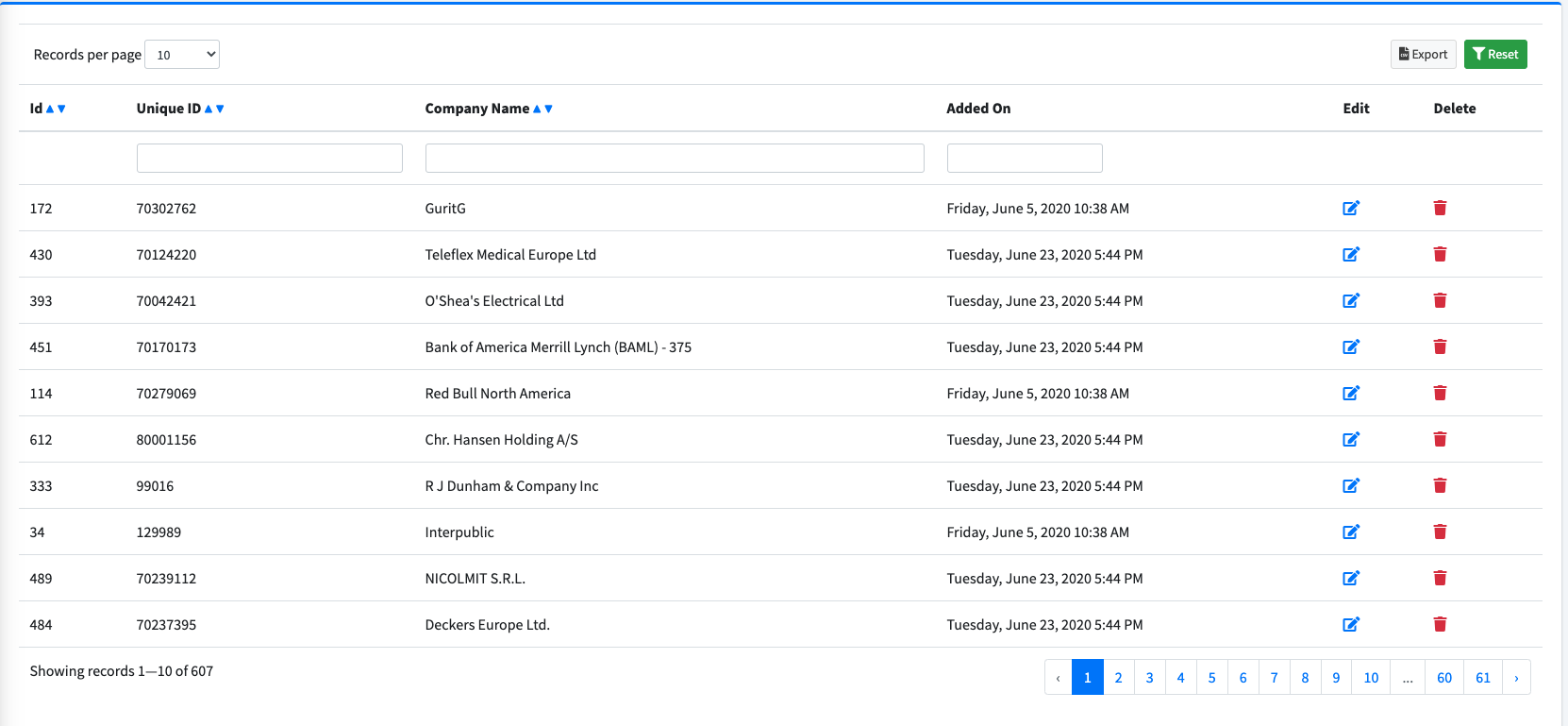
        $this->grid->addColumn('name', 'Company Name')->setSortable()->setSearchFilter();
        $this->grid->addColumn('created_at', 'Added On')->setCallback(function ($createdAt) {
            if (null === $createdAt || !$createdAt instanceof Carbon) {
                return '-';
            }
            return Carbon::createFromTimestamp($createdAt->timestamp)->isoFormat('LLLL');
        })->setDateFilter();

        $this->grid->addColumn('edit_client', 'Edit')->setCallback(function ($val, $row) {
            return "<a href='#'><i class='fas fa-edit'></i></a>";
        });

        $this->grid->addColumn('delete_client', 'Delete')->setCallback(function ($val, $row) {
            return "<a href='#' class='text-danger'><i class='fas fa-trash'></i></a>";
        });
    }
}
That's all, our grid is configured.
Create a blade(view) file (ex. company.blade.php) and include the grid in it. see below example -
@extends('layouts.app')

@section('content')
    @include('grids::default')
@endsection
Make you to add the below in your main layout -
@yield('grid_css')
@yield('grid_js')
Now create you route and return the company view. You will see a grid something similar to following.
© 2020—2020 Keshari Nandan
License: Proprietary


