Display the connected database information in console.
thedevsaddam/laravel-schema is a Laravel package for display the connected database information in console..
It currently has 111 GitHub stars and 29.289 downloads on Packagist (latest version 2.0.3).
Install it with composer require thedevsaddam/laravel-schema.
Discover more Laravel packages by thedevsaddam
or browse all Laravel packages to compare alternatives.
Last updated
This package will help to display database schema information from terminal.
Via Composer
$ composer require thedevsaddam/laravel-schema
Install manually (add the line to composer.json file)
"thedevsaddam/laravel-schema": "^2.0"
Then open your terminal and hit the command
composer update
Add the following line to config/app.php file's providers array
Thedevsaddam\LaravelSchema\LaravelSchemaServiceProvider::class,
For lumen open bootstrap/app.php and add the line below
$app->register(Thedevsaddam\LaravelSchema\LaravelSchemaServiceProvider::class);
php artisan schema:help Display the available commands and usages.php artisan schema:simple Display overall tables with total rows count.php artisan schema:list Display all the available tables. schema information in list (please see details below).php artisan schema:show Display all the available tables schema information in tabular form (please see details below).php artisan schema:table --t=yourTableName or --t=Namespace\\Model Display a table's paginated data (please see details below).php artisan schema:query --r="wirte your raw sql query in double quote" Perform a sql query.php artisan schema:monitor Display database server status.Show Schema information in tabular form
php artisan schema:show
Example output: Schema information in tabular form
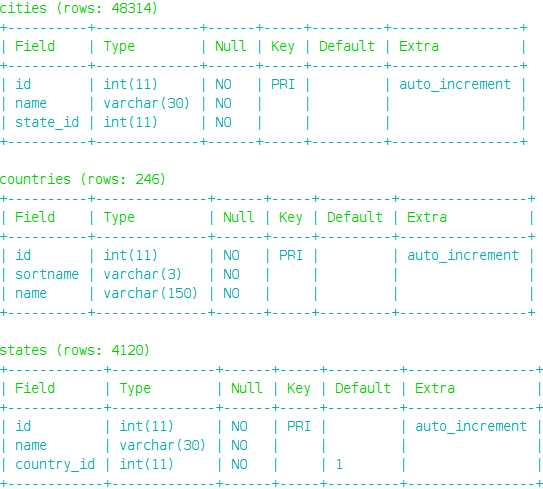
If you want to see a specific table then pass table name or Namespace\\Model
php artisan schema:show --t=tableName or --t=Namespace\\Model

Note: Same condition will be applied for tables list view
Show Schema information in List
php artisan schema:list
Example output: Schema information in list
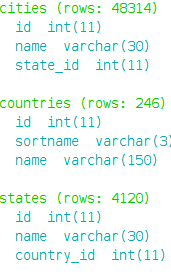
Avaliable Options in show and list:
--t=tableName or -t tableName to provide table name or Namespace\Model--c=connectionName or -c connectionName to provide connection nameShow Table names and total rows
php artisan schema:simple
Example output: Tables name with rows count
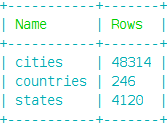
Note: You may pass --c=connectionName or -c connectionName to display a specific connection schema info
Show table definition
php artisan schema:table --t=tableName or --t=Namespace\\Model
Example output: Table definition with default page and limit
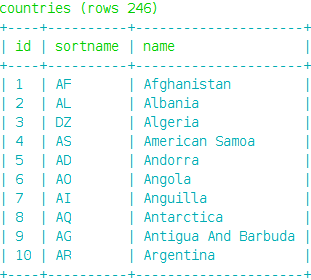
Avaliable Options in table:
--t=tableName or -t tableName to provide table name or Namespace\\Model (e.g: --t=App\\User or --t=users).--p=pageNumber or -p PageNumber to provide current page which you want to see--o=orderBy or -o orderBy to provide orderBy clause against a column (e.g: --o=id:desc or --o=id:asc [default asc]).--l=rowsLimitPerPage or -l rowsLimitPerPage to provide number of rows you want to display (e.g: --l=20).--c=connectionName or -c connectionName to provide connection name--w=widthOfTableCell or -w widthOfTableCell to provide character length of cell to show in tables (numeric [default=10]).--s=columnName to provide the column to display, you can provide comma (,) separated names to display (e.g: --s=name or --s=id,name).php artisan schema:table --t=countries --p=4 --o=id:desc --l=25
Perform raw sql query
php artisan schema:query --r="your sql query"
Example output: Query result will be dumped in console
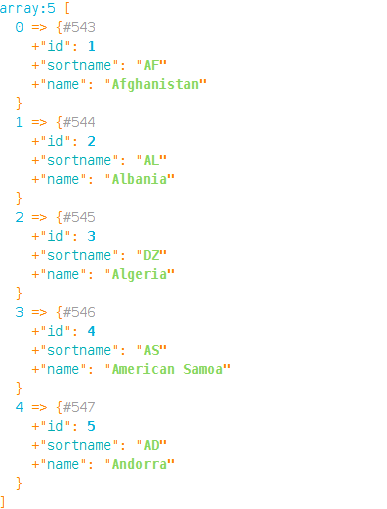
Avaliable Options in query:
--r=yourRawQuery or -r yourRawQuery to provide your raw sql query (e.g: --r="select * from someTable limit 20").--c=connectionName or -c connectionName to provide connection name (e.g: --c=mysql or -c sqlite)Monitor database server
php artisan schema:monitor
Example output: Showing the database status
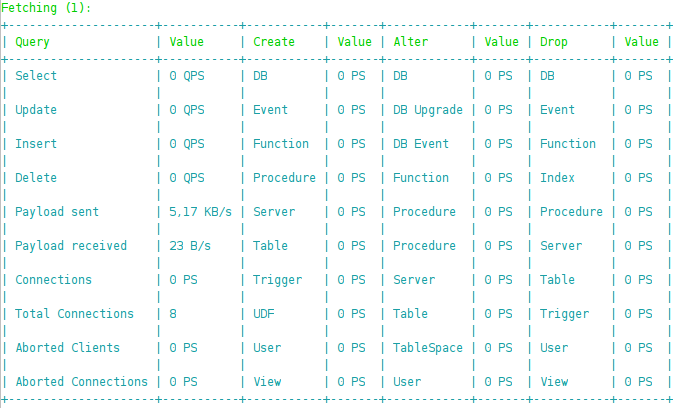
You can pass --i=integerNumber as refresh time interval and --c=ConnectionName as well
php artisan schema:monitor --i=3 --c=secondaryDatabase
The laravel-schema is a open-source software licensed under the MIT License.
Thank you :)