Easily stream your Laravel application logs to the browser console.log in real-time using server-sent event (SSE)
saasscaleup/laravel-console-log is a Laravel package for easily stream your laravel application logs to the browser console.log in real-time using server-sent event (sse).
It currently has 64 GitHub stars and 457 downloads on Packagist (latest version 1.0.0).
Install it with composer require saasscaleup/laravel-console-log.
Discover more Laravel packages by saasscaleup
or browse all Laravel packages to compare alternatives.
Last updated



console.log')(data)).storage/logs/laravel.log)to Frontend browser console tab (console.log')(data)).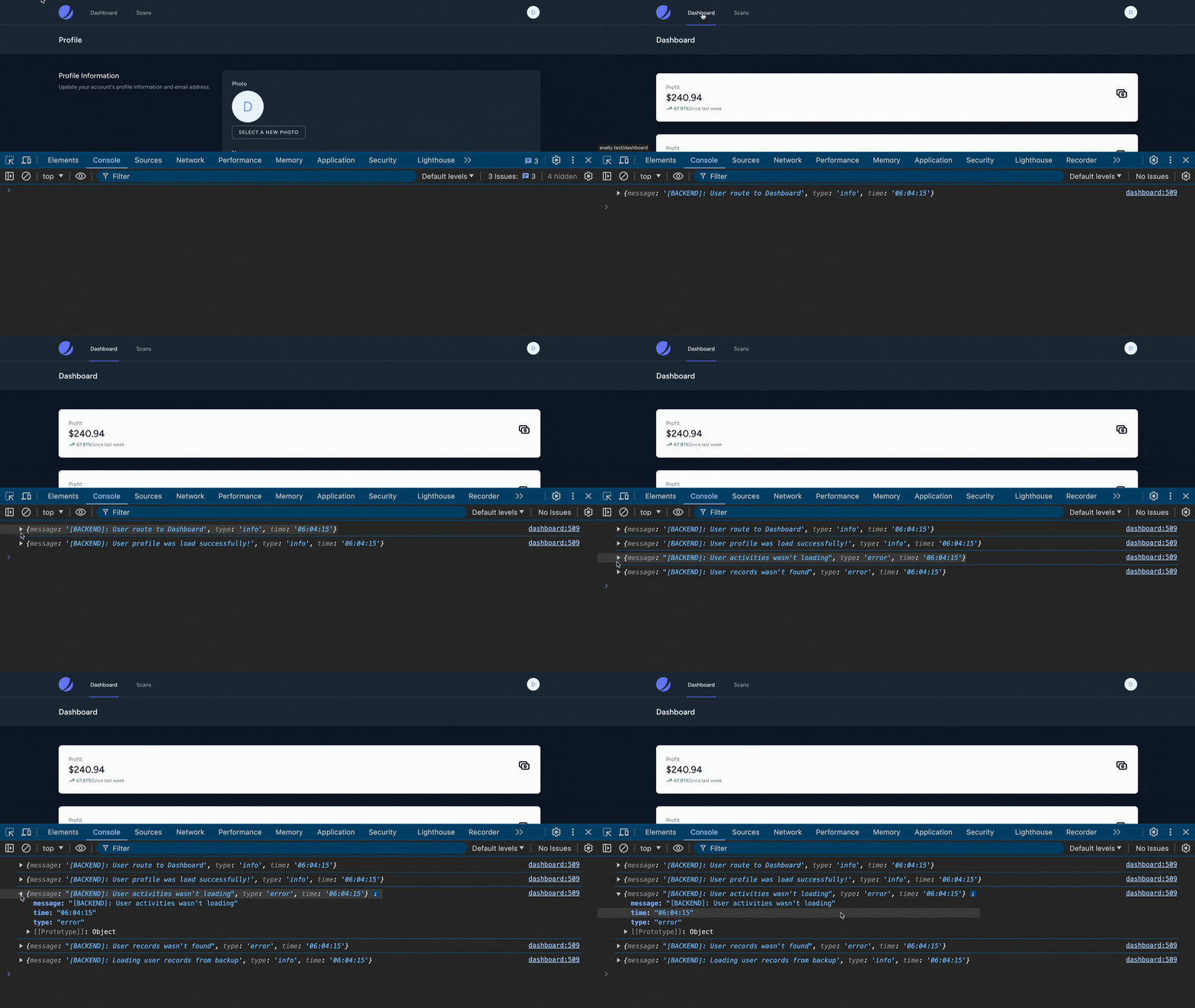
Via Composer - Not recommended for production environment
composer require --dev saasscaleup/laravel-console-log
Add Service Provider to config/app.php in providers section
Saasscaleup\LCL\LCLServiceProvider::class,
Add Facade to config/app.php in aliases section
'LCL' => Saasscaleup\LCL\Facades\LCLFacade::class,
Publish package's config, migration and view files by running below command:
php artisan vendor:publish --provider="Saasscaleup\LCL\LCLServiceProvider"
Run php artisan migrate to create stream_console_logs table.
php artisan migrate
Add this in your main view/layout (usually layout/app.blade.php) file before
@include('lcl::view')
<body>
...
@include('lcl::view')
</body>
Configuration is done via environment variables or directly in the configuration file (config/lcl.php).
<?php

return [

    // enable or disable LCL
    'enabled' => env('LCL_ENABLED', true),

    // enable or disable laravel log listener
    'log_enabled' => env('LCL_LOG_ENABLED', true),

    // log listener  for specific log type
    'log_type' => env('LCL_LOG_TYPE', 'info,error,warning,alert,critical,debug'), // Without space

    // log listener for specific word inside log messages
    'log_specific' => env('LCL_LOG_SPECIFIC', ''), // 'test' or 'foo' or 'bar' or leave empty '' to disable this feature

    // echo data loop in LCLController
    'interval' => env('LCL_INTERVAL', 1),

    // append logged user id in LCL response
    'append_user_id' => env('LCL_APPEND_USER_ID', true),

    // keep events log in database
    'keep_events_logs' => env('LCL_KEEP_EVENTS_LOGS', false),

    // Frontend pull invoke interval
    'server_event_retry' => env('LCL_SERVER_EVENT_RETRY', '2000'),

    // every 10 minutes cache expired, delete logs on next request
    'delete_log_interval' => env('LCL_DELETE_LOG_INTERVAL', 600),

    /******* Frontend *******/

    // eanlbed console log on browser
    'js_console_log_enabled' => env('LCL_JS_CONSOLE_LOG_ENABLED', true),

];
Syntax:
/**
* @param string $message : notification message
* @param string $type : alert, success, error, warning, info, debug, critical, etc...
* @param string $event : Type of event such as "EmailSent", "UserLoggedIn", etc
 */
LCLFacade::notify($message, $type = 'info', $event = 'stream-console-log')
To show popup notifications on the screen, in your controllers/event classes, you can do:
use Saasscaleup\LCL\Facades\LCLFacade;

public function myFunction()
{

    LCLFacade::notify('Invoke stream log via Facade 1');

    // Some code here

    LCLFacade::notify('Invoke stream log via Facade 2');

    // Some code here

    LCLFacade::notify('Invoke stream log via Facade 3');

    // or via helper
    stream_log('Invoke stream log via helper 1');
    stream_log('Invoke stream log via helper 2');
    stream_log('Invoke stream log via helper 3');


    // or using your application
    \Log::info('Invoke stream log via application log 1');
    \Log::error('Invoke stream log via application log 2');
    \Log::debug('Invoke stream log via application log 3');

}
You can also, customize this by modifying code in resources/views/vendor/lcl/view.blade.php file.
By default, package uses stream-console-log event type for streaming response:
LCLFacade::notify($message, $type = 'info', $event = 'stream-console-log')
Notice $event = 'stream-console-log'. You can customize this, let's say you want to use UserPurchase as SSE event type:
use Saasscaleup\LCL\Facades\LCLFacade;

public function myMethod()
{
    LCLFacade::notify('User purchase plan - step 1', 'info', 'UserPurchase');

    // or via helper
    stream_console_log('User purchase plan - step 1', 'info', 'UserPurchase');
}
Then you need to handle this in your view yourself like this:
<script>
var es = new EventSource("{{route('lcl-stream-log')}}");

es.addEventListener("UserPurchase", function (e) {
    var data = JSON.parse(e.data);
    alert(data.message);
}, false);

</script>
Please see the MIT for more information.
If you Like the tutorial and you want to support my channel so I will keep releasing amzing content that will turn you to a desirable Developer with Amazing Cloud skills... I will realy appricite if you:
Thanks for your support :)


