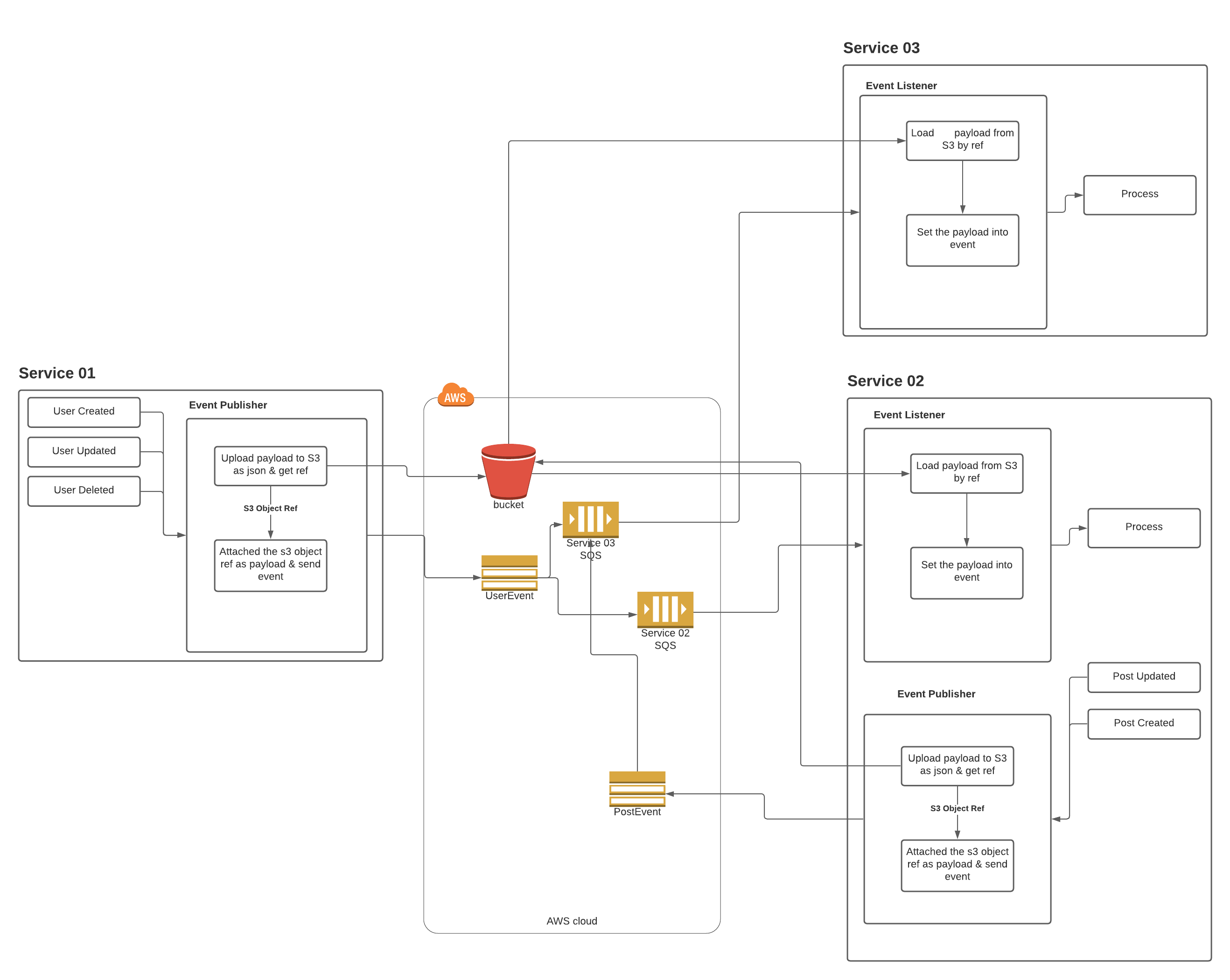
A simple Laravel service provider which adds a new queue connector to handle SNS subscription queues.
ratheeps/laravel-pub-sub-messaging is a Laravel package for a simple laravel service provider which adds a new queue connector to handle sns subscription queues..
It currently has 0 GitHub stars and 6 downloads on Packagist (latest version 1.0.4).
Install it with composer require ratheeps/laravel-pub-sub-messaging.
Discover more Laravel packages by ratheeps
or browse all Laravel packages to compare alternatives.
Last updated
Simple extension to the Illuminate/Queue queue system used in Laravel and Lumen.
Using this connector allows SQS messages originating from a SNS subscription to be worked on with Illuminate\Queue\Jobs\SqsJob.
This is especially useful in a miroservice architecture where multiple services subscribe to a common topic with their queues and publish an event to SNS.
The Amazon SQS Extended Client Library for Laravel enables you to manage Amazon SQS message payloads with Amazon S3. This is especially useful for storing and retrieving messages with a message payload size greater than the current SQS limit of 256 KB, up to a maximum of 2 GB. Specifically, you can use this library to:
Note: This package under development not ready for production -
We highly recommend you use a private bucket when storing SQS payloads. Payloads can contain sensitive information and should never be shared publicly.
Run composer require ratheeps/laravel-pub-sub-messaging to install the package.
Then, add the following queue settings to your queue.php file.
<?php
return [
    'connections' => [
        'pub-sub-messaging-sqs' => [
            'driver' => 'pub-sub-messaging-sqs',
            'key' => env('PUB_SUB_MESSAGING_AWS_ACCESS_ID'),
            'secret' => env('PUB_SUB_MESSAGING_AWS_SECRET_ACCESS_KEY'),
            'prefix' => env('PUB_SUB_MESSAGING_SQS_PREFIX', 'https://sqs.us-east-1.amazonaws.com/your-account-id'),
            'queue' => env('PUB_SUB_MESSAGING_SQS_QUEUE', 'default'),
            'suffix' => env('PUB_SUB_MESSAGING_SQS_SUFFIX'),
            'region' => env('PUB_SUB_MESSAGING_AWS_DEFAULT_REGION', 'us-east-1'),
            'after_commit' => false,
            'disk_options' => [
                'always_store' => true,
                'cleanup' => false,
                'disk' => env('PUB_SUB_MESSAGING_DISK', 'pub_sub_messaging_s3'),
                'prefix' => '',
            ],
        ],
    ],
];
4 Then, add the following disk settings to your filesystems.php file.
<?php
return [
    'disks' => [
        'pub_sub_messaging_s3' => [
            'driver' => 's3',
            'key' => env('PUB_SUB_MESSAGING_AWS_ACCESS_ID'),
            'secret' => env('PUB_SUB_MESSAGING_AWS_SECRET_ACCESS_KEY'),
            'region' => env('PUB_SUB_MESSAGING_AWS_DEFAULT_REGION'),
            'bucket' => env('PUB_SUB_MESSAGING_AWS_BUCKET'),
            'url' => env('PUB_SUB_MESSAGING_AWS_URL'),
            'endpoint' => env('PUB_SUB_MESSAGING_AWS_ENDPOINT'),
            'use_path_style_endpoint' => env('AWS_USE_PATH_STYLE_ENDPOINT', false),
        ],
    ],
];
php artisan vendor:publish --provider="Ratheeps\PubSubMessaging\PubSubMessagingServiceProvider" --tag="config" this command
Then, modify the following pub sub settings to your pub-sub-messaging.php file.<?php
return [
'default_topic' => env('PUB_SUB_MESSAGING_DEFAULT_TOPIC'),
'default_auth_driver' => null,
// map the jobs to subscribe SNS topics to handle the consuming events
'map' => [
// \App\Jobs\TestSQSJob::class => 'arn:aws:sns:ap-southeast-1:931616835216:modelEvent',
],
'published_attributes' => [
'id',
'created_at',
'updated_at'
],
'sns' => [
'key' => env('PUB_SUB_MESSAGING_AWS_ACCESS_KEY'),
'secret' => env('PUB_SUB_MESSAGING_AWS_SECRET_ACCESS_KEY'),
'region' => env('PUB_SUB_MESSAGING_AWS_DEFAULT_REGION', 'us-east-1'),
'disk_options' => [
// Indicates when to send messages to S3., Allowed values are: ALWAYS, NEVER, IF_NEEDED.
'store_payload' => 'IF_NEEDED',
'disk' => env('PUB_SUB_MESSAGING_DISK', 'pub_sub_messaging_s3'),
'prefix' => ''
]
]
];
PUB_SUB_MESSAGING_AWS_ACCESS_ID=
PUB_SUB_MESSAGING_AWS_SECRET_ACCESS_KEY=
PUB_SUB_MESSAGING_AWS_DEFAULT_REGION=ap-south-1

PUB_SUB_MESSAGING_DEFAULT_TOPIC=
PUB_SUB_MESSAGING_AWS_BUCKET=
PUB_SUB_MESSAGING_DISK=pub_sub_messaging_s3

QUEUE_CONNECTION=pub-sub-messaging-sqs
PUB_SUB_MESSAGING_SQS_QUEUE=
Create a job like below to handle the event and then map that job to SNS topic in the pub-sub-messaging.php config file
<?php
use Illuminate\Bus\Queueable;
use Illuminate\Queue\SerializesModels;
use Illuminate\Queue\InteractsWithQueue;
use Illuminate\Contracts\Queue\ShouldQueue;
use Illuminate\Foundation\Bus\Dispatchable;
use Illuminate\Support\Facades\Log;

class TestSQSJob implements ShouldQueue
{
    use Dispatchable, InteractsWithQueue, Queueable, SerializesModels;

    protected $passedInData;

    /**
     * Create a new job instance.
     *
     * @param array $data
     */
    public function __construct(array $data)
    {
        // $data is array containing the msg content from SQS
        $this->passedInData = $data;
    }

    /**
     * Execute the job.
     *
     * @return void
     */
    public function handle()
    {
        Log::info(json_encode($this->passedInData));
        // Check laravel.log, it should now contain msg string.
    }
}
<?php
namespace App;

use Illuminate\Database\Eloquent\Model;
use Ratheeps\PubSubMessaging\Traits\SNSPublisher;

class Post extends Model
{
    use SNSPublisher;

    /**
     * @var array
     * Optional (default value is [] )
     * Witch are the attributes should only from SNS message
     */
    static $publishedAttributes = [
        'id',
        'created_at',
        'updated_at'
    ];

    /**
     * @var array
     * Optional  (default value is [created','updated','deleted','restored'] )
     * Witch events should send to SNS
     */
    static $publishEvents = ['created', 'updated'];

    /**
     * @var string
     * Optional (default value is load from config )
     * Publish SNS topic
     */
    static $publishTopic = 'SampleTopic';
    /**
     * Or
     * static $publishTopic = [
     *  'created' => 'SampleTopic'
     * ];
     */
}
This diagram will be describing how your microservices are communicating with help of this package