Laravel Nova resource and fields for single record resources
norman-huth/nova-single-resource is a Laravel package for laravel nova resource and fields for single record resources.
It currently has 5 GitHub stars and 14.955 downloads on Packagist (latest version 0.0.5).
Install it with composer require norman-huth/nova-single-resource.
Discover more Laravel packages by norman-huth
or browse all Laravel packages to compare alternatives.
Last updated
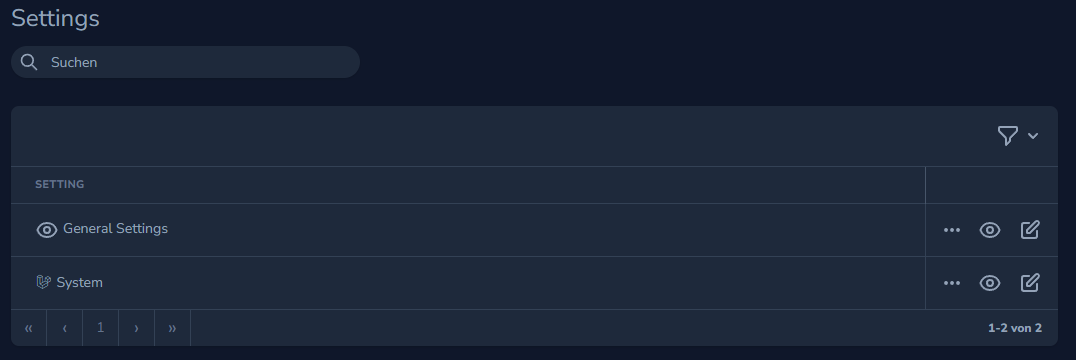
Create resources for "single" resources (key-value database structure), such as a settings table.
composer require norman-huth/nova-single-resource
The following description refers to the Model Settings as an example....
You can create a resource with php artisan nova:single-resource Setting.
The table still requires a primary ID and this package is designed to allow the Value column to be nullable.
use NormanHuth\SingleResource\Traits\ResourceTrait;

class Setting extends Resource
{
    use ResourceTrait;  // required

    public function __construct($resource = null)
    {
        $this->bootResourceTrait(); // Required
        parent::__construct($resource);
    }

    protected static function sections(): array
    {
        return [
            'general-settings' =>
            [
                'name'   => __('General Settings'),
                'icon'   => 'eye',
            ],
            'system' =>
            [
                'name'   => __('System'),
                'faIcon' => 'fa-brands fa-laravel fa-fw',
            ],
        ];
    }

    /**
     * The model the resource corresponds to.
     *
     * @var string
     */
    public static string $model = \App\Models\Setting::class;

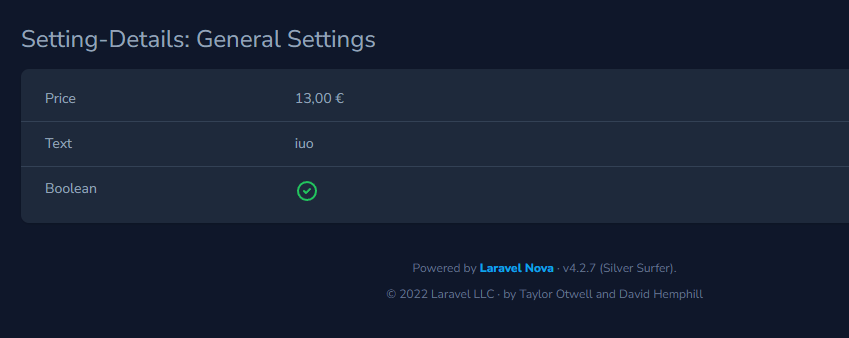
    public function getGeneralSettingsFields(NovaRequest $request): array
    {
        return [
            Currency::make('Price')->currency('EUR'),
            Text::make(__('Text'), 'text'),
            Boolean::make(__('Boolean'), 'boolean'),
        ];
    }

    public function getSystemFields(NovaRequest $request): array
    {
        return [
            Date::make(__('Date'), 'Date'),
            DateTime::make(__('DateTime'), 'DateTime'),
        ];
    }
}
sections()'general-settings' => // Required: unique slug
[
'name' => 'My Settings' // Required: Display section name
'icon' => 'eye', // Optional: Heroicon icon https://heroicons.com/
'faIcon' => 'fa-brands fa-laravel fa-fw', // Optional: FontAwesome Icon (not included!) https://fontawesome.com/
],
And add for every section fields.
Format: get'.Str::studly($slug).'Fields: getGeneralSettingsFields(NovaRequest $request)
By default, the columns key and value are used in the database.
If you want to use others. You must specify them in the model:
class Setting extends Model
{
    public static string $keyColumn = 'key';
    public static string $valueColumn = 'value';
Text::make(__('SMTP Password'), 'smtp_password')
    ->cast('encrypted'),
In this resource must be used adjusted fields.
The following fields are already included:
| Original | Single Resource | |--------------------------------------------------------------------------------------------|-----------------------------------------------| | Boolean | NormanHuth\SingleResource\Fields\Boolean | | BooleanGroup | NormanHuth\SingleResource\Fields\BooleanGroup | | Color | NormanHuth\SingleResource\Fields\Color | | Country | NormanHuth\SingleResource\Fields\Country | | Currency | NormanHuth\SingleResource\Fields\Currency | | Date | NormanHuth\SingleResource\Fields\Date | | DateTime | NormanHuth\SingleResource\Fields\DateTime | | KeyValue | NormanHuth\SingleResource\Fields\KeyValue | | Markdown | NormanHuth\SingleResource\Fields\Markdown | | MultiSelect | NormanHuth\SingleResource\Fields\MultiSelect | | Number | NormanHuth\SingleResource\Fields\Number | | Select | NormanHuth\SingleResource\Fields\Select | | Text | NormanHuth\SingleResource\Fields\Text | | Textarea | NormanHuth\SingleResource\Fields\Textarea | | Timezone | NormanHuth\SingleResource\Fields\Timezone | | Trix | NormanHuth\SingleResource\Fields\Trix |
| Original | Single Resource | |-----------------------------------------------------------------------------------|-----------------------------------------| | File | NormanHuth\SingleResource\Fields\File | | Image | NormanHuth\SingleResource\Fields\Image | | Avatar | NormanHuth\SingleResource\Fields\Avatar |
| Package | Single Resource |
|--------------------------------------------------------------------------------------------|------------------------------------------------------------------------------------------------------|
| flatroy/nova-progressbar-field | NormanHuth\SingleResource\Fields\Flatroy\FieldProgressbar |
| murdercode/seo-title | NormanHuth\SingleResource\Fields\Murdercode\SeoTitle |
| murdercode/nova4-seo-description | NormanHuth\SingleResource\Fields\Murdercode\SeoDescription |
| murdercode/nova4-tinymce-editor | NormanHuth\SingleResource\Fields\Murdercode\TinymceEditor |
| norman-huth/nova-bbcode-textarea | NormanHuth\SingleResource\Fields\NormanHuth\BBCode
NormanHuth\SingleResource\Fields\NormanHuth\BB |
| norman-huth/nova-iframe-popup | NormanHuth\SingleResource\Fields\NormanHuth\IframePopup |
| norman-huth/nova-secret-field | NormanHuth\SingleResource\Fields\NormanHuth\SecretField |
| norman-huth/nova-values-field | NormanHuth\SingleResource\Fields\NormanHuth\Values |
protected string $cast. Example here. See protected function castValue in the traitResourceUpdateController & Update component to be able to use slugs in url