Laravel Wrapper for `ksubileau/color-thief-php`. Grabs the dominant color or a representative color palette from an image. Uses PHP and GD or Imagick.
nikkanetiya/laravel-color-palette is a Laravel package for laravel wrapper for `ksubileau/color-thief-php`. grabs the dominant color or a representative color palette from an image. uses php and gd or imagick..
It currently has 33 GitHub stars and 12.807 downloads on Packagist (latest version 1.3.0).
Install it with composer require nikkanetiya/laravel-color-palette.
Discover more Laravel packages by nikkanetiya
or browse all Laravel packages to compare alternatives.
Last updated
Laravel Wrapper for Color-Thief-PHP with additional changes. Grabs the dominant color or a representative color palette from an image. Uses PHP and GD or Imagick.
This Laravel package is extremely useful to grab dominant color or a representative color palette from images. See this image for the example.
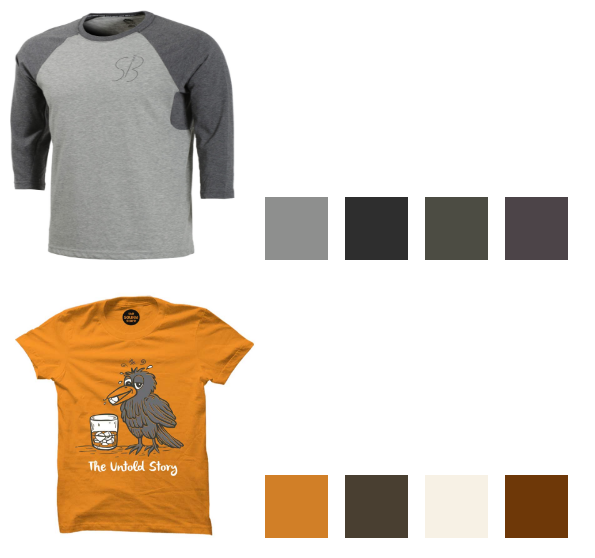
You can install the package via Composer:
composer require nikkanetiya/laravel-color-palette
You must install the service provider (For Laravel < 5.5):
// config/app.php
'providers' => [
    ...
    NikKanetiya\LaravelColorPalette\ColorPaletteServiceProvider::class,
],
Register facade:
// config/app.php
'aliases' => [
    ...
    'ColorPalette' => NikKanetiya\LaravelColorPalette\ColorPaletteFacade::class,
],
getColor() - Use this method to get most dominant single color form image
Example:
// get most dominant color from image

$color = ColorPalette::getColor( 'https://rawcdn.githack.com/nikkanetiya/laravel-color-palette/master/tests/images/strawberry.jpeg' );

// Color provides several getters/properties
echo $color;             // '#dc5550'
echo $color->rgbString;  // 'rgb(220,85,80)'
echo $color->rgbaString; // 'rgba(220,85,80,1)'
echo $color->int;        // 14439760
print_r($color->rgb);        // array(220, 85, 80)
print_r($color->rgba);       // array(220, 85, 80, 1)
$color = ColorPalette::getColor($sourceImage, $quality = 10, $area = null );
By default, getColor will have quality -> 10 and specific area -> null.
Quality can be int. 1 is the highest quality. There is a trade-off between quality and speed. The bigger the number, the faster the palette generation but the greater the likelihood that colors will be missed.Area can be array|null $area[x,y,w,h]. It allows you to specify a rectangular area in the image in order to get colors only for this area. It needs to be an associative array with the following keys:
getPalette() - Use this method to find representative color palette form image.
Example:
// get colors from image

$colors = ColorPalette::getPalette( 'https://github.com/nikkanetiya/laravel-color-palette/blob/master/tests/images/strawberry.jpeg' );

foreach($colors as $color) {
    //
}
// Colors will be array of Color Objects
$color = ColorPalette::getPalette($sourceImage, $colorCount = 10, $quality = 10, $area = null)
colorCount can be 2 to 256. It is the number of colors you want to retrieve for the image.Quality & Area is same as above.Image Source: https://www.pexels.com, google image


