Laravel Menu Builder | Drag & Drop | Bootstrap | Laravel 7 | Laravel 8 | Laravel 9 | Laravel 10 | Laravel 11 | Laravel 12
nguyendachuy/laravel-menu is a Laravel package for laravel menu builder | drag & drop | bootstrap | laravel 7 | laravel 8 | laravel 9 | laravel 10 | laravel 11 | laravel 12.
It currently has 16 GitHub stars and 2.285 downloads on Packagist (latest version v1.0.2).
Install it with composer require nguyendachuy/laravel-menu.
Discover more Laravel packages by nguyendachuy
or browse all Laravel packages to compare alternatives.
Last updated
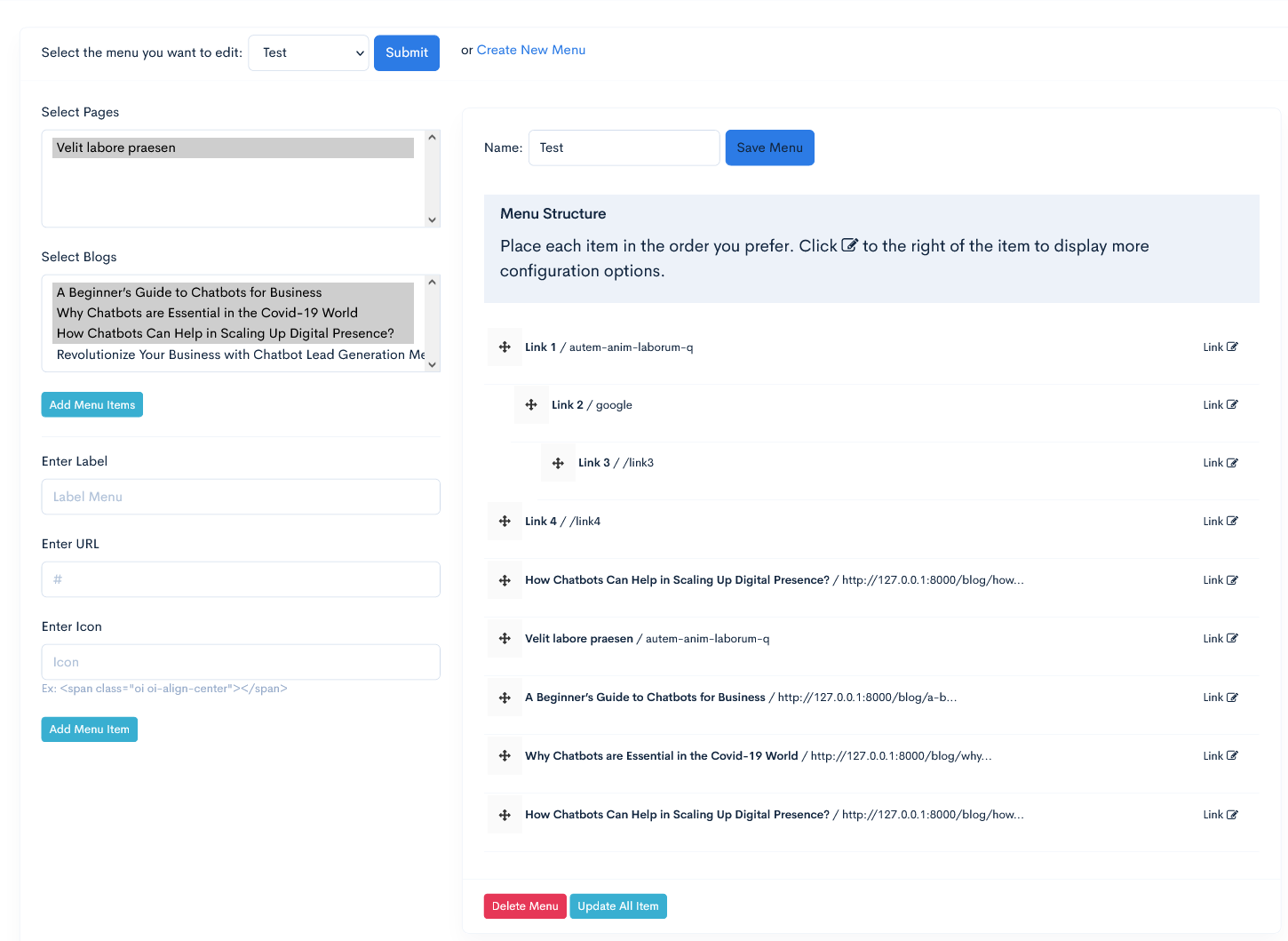
We're excited to announce a major upgrade of Laravel Drag and Drop Menu Builder available on the upgrade-version branch. This version adds significant new features and improvements, especially comprehensive multilingual support.
upgrade-version Branch# Clone repository (if you don't have it)
git clone https://github.com/nguyendachuy/laravel-menu.git
# Switch to upgrade-version branch
git checkout upgrade-version
# Install dependencies
composer install
Update your composer.json file to use the upgrade-version branch:
{
    "require": {
        "nguyendachuy/laravel-menu": "dev-upgrade-version"
    }
}
Then run:
composer update nguyendachuy/laravel-menu
The new version adds columns for the Mega Menu feature. Run migrations to update your database structure:
php artisan migrate
The migration will add the following columns to the menu_items table:
is_mega_menu (boolean): Determines if an item is a mega menumega_menu_content (text): Stores the HTML content of the mega menuThe new version includes many changes to config, views, and public files. Run the following command to update:
# Publish all resources
php artisan vendor:publish --provider="NguyenHuy\Menu\Providers\MenuServiceProvider" --force

# Or publish specific resource types
php artisan vendor:publish --tag=laravel-menu-config --force
php artisan vendor:publish --tag=laravel-menu-views --force
php artisan vendor:publish --tag=laravel-menu-assets --force
php artisan vendor:publish --tag=laravel-menu-translations --force
Important Note: Using --force will overwrite any customizations you've made. If you've customized files, back them up before running these commands.
The upgrade-version branch has not yet been merged into master to avoid affecting current users. We encourage you to test this branch in a development environment before applying it to production projects.
Feedback and contributions are welcome to help us improve this package before the official release.
Please refer to the README.md in the upgrade-version branch for complete details on new features and usage instructions.
composer require nguyendachuy/laravel-menu
php artisan vendor:publish --provider="NguyenHuy\Menu\Providers\MenuServiceProvider"
true if you want to enable caching for menu items. Default is false.'menu'.60.php artisan migrate
DONE
On your view blade file
@extends('app')

@section('contents')
    {!! Menu::render() !!}
@endsection

//YOU MUST HAVE JQUERY LOADED BEFORE menu scripts
@push('scripts')
    {!! Menu::scripts() !!}
@endpush
Call the model class
use NguyenHuy\Menu\Models\Menus;
use NguyenHuy\Menu\Models\MenuItems;
A basic two-level menu can be displayed in your blade template
/* get menu by id*/

$menu = Menus::find(1);
/* or by name */
$menu = Menus::where('name','Test Menu')->first();

/* or get menu by name and the items with EAGER LOADING (RECOMENDED for better performance and less query call)*/
$menu = Menus::where('name','Test Menu')->with('items')->first();
/*or by id */
$menu = Menus::where('id', 1)->with('items')->first();

//you can access by model result
$public_menu = $menu->items;

//or you can convert it to array
$public_menu = $menu->items->toArray();
// Using Helper
$public_menu = Menu::getByName('Public'); //return array
Now inside your blade template file place the menu using this simple example
<div class="nav-wrap">
    <div class="btn-menu">
        <span></span>
    </div><!-- //mobile menu button -->
    <nav id="mainnav" class="mainnav">

        @if($public_menu)
        <ul class="menu">
            @foreach($public_menu as $menu)
            <li class="">
                <a href="{{ $menu['link'] }}" title="">{{ $menu['label'] }}</a>
                @if( $menu['child'] )
                <ul class="sub-menu">
                    @foreach( $menu['child'] as $child )
                        <li class=""><a href="{{ $child['link'] }}" title="">{{ $child['label'] }}</a></li>
                    @endforeach
                </ul><!-- /.sub-menu -->
                @endif
            </li>
            @endforeach
        @endif

        </ul><!-- /.menu -->
    </nav><!-- /#mainnav -->
 </div><!-- /.nav-wrap -->
use NguyenHuy\Menu\Facades\Menu;
...
/*
Parameter: Menu ID
Return: Array
*/
$menuList = Menu::get(1);
In this example, you must have a menu named Admin
use NguyenHuy\Menu\Facades\Menu;
...
/*
Parameter: Menu ID
Return: Array
*/
$menuList = Menu::getByName('Admin');
You can edit the menu interface in resources/views/vendor/nguyendachuy-menu/menu-html.blade.php


