Laravel package to Crop and Upload Square/Circular User Profile Picture
monim67/laravel-user-image-croppie is a Laravel package for laravel package to crop and upload square/circular user profile picture.
It currently has 12 GitHub stars and 336 downloads on Packagist (latest version v1.0.2).
Install it with composer require monim67/laravel-user-image-croppie.
Discover more Laravel packages by monim67
or browse all Laravel packages to compare alternatives.
Last updated
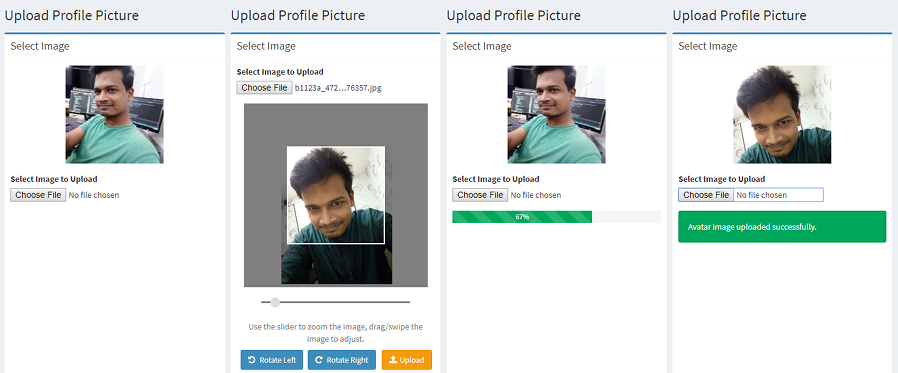
This package adds square/circular user profile image with an update event to laravel application. Users can rotate, resize and crop profile picture before upload with pure JavaScript, no jQuery needed. An avatar controller is included to handle image upload which emits an event after a successful avatar upload.


Install the package via composer and publish the config file.
composer require monim67/laravel-user-image-croppie
php artisan vendor:publish --provider="Monim67\LaravelUserImageCroppie\ServiceProvider" --tag=config
If you already have a database column for user's image, you need to specify it in the config file, otherwise
you can publish the migration from this package that adds a column named avatar to users table.
php artisan vendor:publish --provider="Monim67\LaravelUserImageCroppie\ServiceProvider" --tag=migrations
php artisan migrate
Add the following to your routes in web.php file.
Route::prefix('avatar')->middleware('auth:web')->group(function(){LUICroppie::routes();});
This will include edit and update routes for user image. You can use any prefix of your choice.
If you only want the update route, use the following instead.
Route::prefix('avatar')->middleware('auth:web')->group(function(){LUICroppie::update_routes_only();});
The edit route will look for resources\views\avatar\edit.blade.php.
So create a file extending your base layout template and include the image upload form in it.
@extends('layouts.main')

@section('content')
@include('lui-croppie::partials.css')
@include('lui-croppie::partials.js')
<div class="row">
    <div class="col-md-8">
        <div class="box box-primary" >
            <div class="box-header with-border">
                <h3 class="box-title">Change Profile Picture</h3>
                <div class="box-tools pull-right">
            </div>
        </div>
            <div class="box-body">
                @include('lui-croppie::bootstrap3.default')
            </div>
        </div>
    </div>
</div>
@stop
That is all you need, the controller is shipped with the package, you don't need to
write controller actions. Run the development server and visit
http://localhost:8000/avatar/edit to see it in action.
You can edit the config file lui-croppie.php in your config directory to customize the options
to your needs.
NOTE: For circular profile picture set image type to circle.
At present only Bootstrap 3 layout is included, few more will be added later. You can also draw your own layout, or even create PR with your own layout.
If you don't want a separate page to upload image, you can add this form to one of
your existing pages ie the profile page or account settings page. Then include only update
route to your web.php and include the password-update form in the page of your choice.
If you want to customize package language files publish them to modify. Files will be published to
resources\lang\vendor\lui-croppie directory. You can create lang files for other languages there.
php artisan vendor:publish --provider="Monim67\LaravelUserImageCroppie\ServiceProvider" --tag=lang
When user uploads an image Monim67\LaravelUserImageCroppie\Events\AvatarUpdate event
is emitted, you can subscribe to the event or add listeners to it.
This package uses Croppie Javascript Image Cropper to crop images to upload.