Laravel Wrapper for `ksubileau/color-thief-php`. Grabs the dominant color or a representative color palette from an image. Uses PHP and GD or Imagick.
kiritokatklian/laravel-color-palette is a Laravel package for laravel wrapper for `ksubileau/color-thief-php`. grabs the dominant color or a representative color palette from an image. uses php and gd or imagick..
It currently has 2 GitHub stars and 10.551 downloads on Packagist (latest version 4.0.2).
Install it with composer require kiritokatklian/laravel-color-palette.
Discover more Laravel packages by kiritokatklian
or browse all Laravel packages to compare alternatives.
Last updated


Laravel Wrapper for Color-Thief-PHP with additional changes. Grabs the dominant color or a representative color palette from an image. Uses PHP and GD or Imagick.
This Laravel package is extremely useful to grab dominant color or a representative color palette from images. See this image for the example.
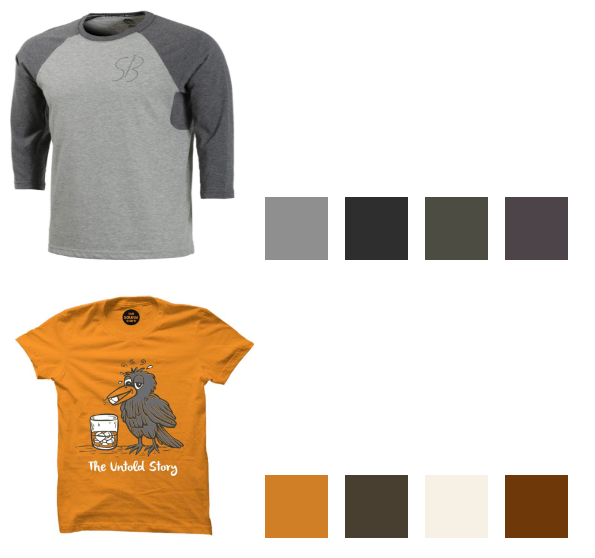
You can install the package via Composer:
$ composer require kiritokatklian/laravel-color-palette
You must install the service provider (For Laravel < 5.5):
// config/app.php
'providers' => [
    ...
    Kiritokatklian\LaravelColorPalette\ColorPaletteServiceProvider::class,
],
Register facade:
// config/app.php
'aliases' => [
    ...
    'ColorPalette' => Kiritokatklian\LaravelColorPalette\ColorPaletteFacade::class,
],
getColor() - Use this method to get most dominant single color form image
Example:
// get most dominant color from image
$color = ColorPalette::getColor( 'https://rawcdn.githack.com/kiritokatklian/laravel-color-palette/master/tests/images/strawberry.jpeg' );

// Color provides several getters/properties
echo $color;             // '#dc5550'
echo $color->rgbString;  // 'rgb(220,85,80)'
echo $color->rgbaString; // 'rgba(220,85,80,1)'
echo $color->int;        // 14439760
print_r($color->rgb);    // array(220, 85, 80)
print_r($color->rgba);   // array(220, 85, 80, 1)
$color = ColorPalette::getColor($sourceImage, $quality = 10, $area = null );
By default, getColor will have quality -> 10 and specific area -> null.
Quality can be int. 1 is the highest quality. There is a trade-off between quality and speed. The bigger the number, the faster the palette generation but the greater the likelihood that colors will be missed.Area can be array|null $area[x,y,w,h]. It allows you to specify a rectangular area in the image in order to get colors only for this area. It needs to be an associative array with the following keys:
getPalette() - Use this method to find representative color palette form image.
Example:
// get colors from image

$colors = ColorPalette::getPalette( 'https://github.com/kiritokatklian/laravel-color-palette/blob/master/tests/images/strawberry.jpeg' );

foreach($colors as $color) {
    //
}
// Colors will be array of Color Objects
$color = ColorPalette::getPalette($sourceImage, $colorCount = 10, $quality = 10, $area = null)
colorCount can be 2 to 256. It is the number of colors you want to retrieve for the image.Quality & Area is same as above.You can run the tests with:
$ composer run test
A big thank you to Nikunj Kanetiya for creating the first version of this package.
Image Source: https://www.pexels.com, google image
The MIT License (MIT). Please see License File for more information.