A CLI tool to create packages for Laravel application.
jackiedo/laravel-packager is a Laravel package for a cli tool to create packages for laravel application..
It currently has 5 GitHub stars and 1.279 downloads on Packagist (latest version 1.1.0).
Install it with composer require jackiedo/laravel-packager.
Discover more Laravel packages by jackiedo
or browse all Laravel packages to compare alternatives.
Last updated
This package is a CLI tool that helps you build a fully structured package for the Laravel application without spending a lot of time.
You do not need to struggle with the skeleton initialization for your package anymore. Instead, focus on writing the source code and letting the organization of the package structure for Laravel Packager.
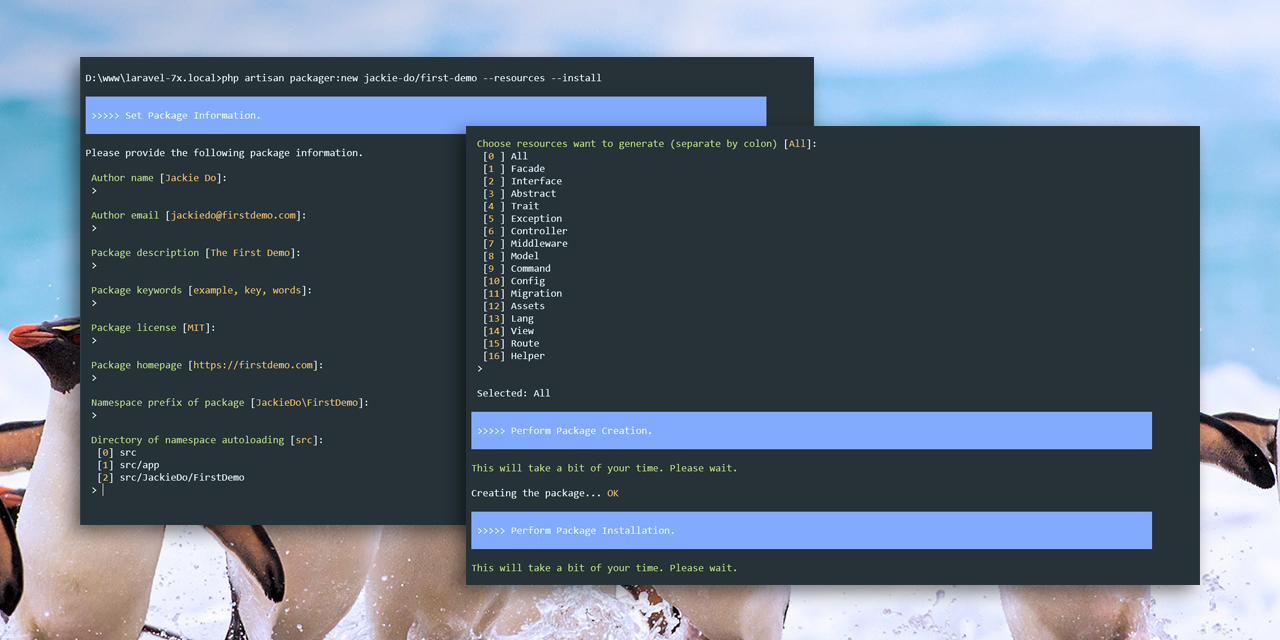
This package is compatible with versions of Laravel 5.1 and above. However, the scaffold resources generated from this package are compatible with versions of Laravel 5.0 and above.
Look at one of the following topics to learn more about Laravel Packager
You can install Laravel Packager through Composer with the steps below.
At the root of your application directory, run the following command:
$ composer require jackiedo/laravel-packager
Note: Since Laravel 5.5, service providers and aliases are automatically registered, you don't need to do anything more. But if you are using Laravel 5.4 or earlier, you must perform one more step below.
Open config/app.php, and add a new line to the providers section:
Jackiedo\Packager\PackagerServiceProvider::class,
Usage:
$ php artisan packager:new [options] [--] <name>
Arguments and options:
Arguments:
  name                               The name (<vendor>/<project>) of the package.

Options:
      --author-name[=AUTHOR-NAME]    Author name.
      --author-email[=AUTHOR-EMAIL]  Author email.
      --description[=DESCRIPTION]    Package description.
      --keywords[=KEYWORDS]          Package keywords.
      --license[=LICENSE]            License of package.
      --homepage[=HOMEPAGE]          Package homepage.
  -r, --resources                    Request to create package with advanced resources.
  -i, --install                      Request to install package after creation.
  -h, --help                         Display this help message
  -q, --quiet                        Do not output any message
  -V, --version                      Display this application version
      --ansi                         Force ANSI output
      --no-ansi                      Disable ANSI output
  -n, --no-interaction               Do not ask any interactive question
      --env[=ENV]                    The environment the command should run under
  -v|vv|vvv, --verbose               Increase the verbosity of messages: 1 for normal output,
                                     2 for more verbose output and 3 for debug
Example:
jackiedo/first-demo package with advanced resources:$ php artisan packager:new jackiedo/first-demo --resources
jackiedo/second-demo package and install it after creation:$ php artisan packager:new jackiedo/second-demo --install
Note:
packages directory at the base path of your Laravel application.--install option in the command, you can install your package later using the composer command composer require your/project. This is useful in case you want to develop complete source code before installing it.Usage:
$ php artisan packager:list
By default, when a package is created, it will be registered to the repositories section in Laravel's composer.json file automatically. This allows you to install your package as a local repository. If for any purpose you want to cancel this registration, use the following command:
Usage:
$ php artisan packager:unregister [options] [--] <name>
Arguments and options:
Arguments:
  name                  The name (<vendor>/<project>) of the package.

Options:
  -u, --uninstall       Request to uninstall package before perform unregister.
  -h, --help            Display this help message
  -q, --quiet           Do not output any message
  -V, --version         Display this application version
      --ansi            Force ANSI output
      --no-ansi         Disable ANSI output
  -n, --no-interaction  Do not ask any interactive question
      --env[=ENV]       The environment the command should run under
  -v|vv|vvv, --verbose  Increase the verbosity of messages: 1 for normal output,
                        2 for more verbose output and 3 for debug
Example: Unregister the jackiedo/first-demo package
$ php artisan packager:unregister jackiedo/first-demo
Note:
composer remove your/project to uninstall it first or use the --uninstall option in your packager:unregister command.After unregister an existing package out of repositories section of composer.json file, if you want to register it again, use the following command:
Usage:
$ php artisan packager:register <name>
Arguments and options:
Arguments:
  name                  The name (<vendor>/<project>) of the package.

Options:
  -h, --help            Display this help message
  -q, --quiet           Do not output any message
  -V, --version         Display this application version
      --ansi            Force ANSI output
      --no-ansi         Disable ANSI output
  -n, --no-interaction  Do not ask any interactive question
      --env[=ENV]       The environment the command should run under
  -v|vv|vvv, --verbose  Increase the verbosity of messages: 1 for normal output,
                        2 for more verbose output and 3 for debug
Usage:
$ php artisan packager:remove [options] [--] <name>
Arguments and options:
Arguments:
  name                  The name (<vendor>/<project>) of the package.

Options:
  -u, --uninstall       Request to uninstall package before removing.
  -h, --help            Display this help message
  -q, --quiet           Do not output any message
  -V, --version         Display this application version
      --ansi            Force ANSI output
      --no-ansi         Disable ANSI output
  -n, --no-interaction  Do not ask any interactive question
      --env[=ENV]       The environment the command should run under
  -v|vv|vvv, --verbose  Increase the verbosity of messages: 1 for normal output,
                        2 for more verbose output and 3 for debug
Example:
$ php artisan packger:remove jackiedo/first-demo --uninstall
If you want to set up more advanced settings such as skeleton structure, suggestions ... you need to publish the configuration file using the vendor:publish command as follow:
$ php artisan vendor:publish --provider="Jackiedo\Packager\PackagerServiceProvider" --tag="config"
Note: Please read the instructions in the configuration file carefully before making any settings.
For more documentation about package development, you can visit Official Laravel Documentation pages:
MIT © Jackie Do