Alternative Swagger with better design, auto-detect routes, and AI integration for Laravel
idnexacloud/laravel-bytedocs is a Laravel package for alternative swagger with better design, auto-detect routes, and ai integration for laravel.
It currently has 8 GitHub stars and 114 downloads on Packagist (latest version v1.2.0).
Install it with composer require idnexacloud/laravel-bytedocs.
Discover more Laravel packages by idnexacloud
or browse all Laravel packages to compare alternatives.
Last updated


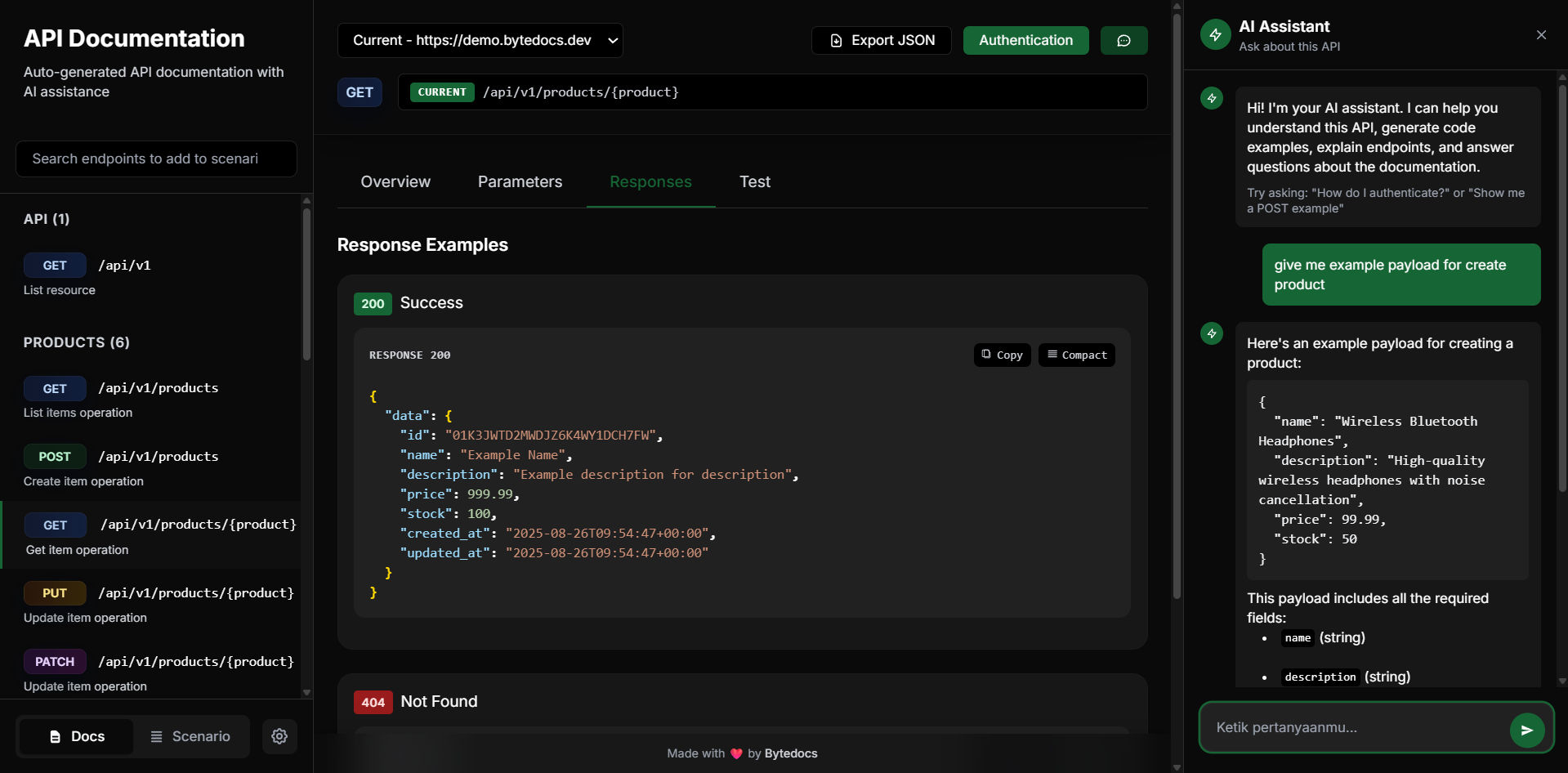
ByteDocs Laravel is a modern alternative to Swagger with better design, auto-detection, and AI integration for Laravel applications. It automatically generates beautiful API documentation from your Laravel routes with zero configuration required.
Install the package via Composer:
composer require idnexacloud/laravel-bytedocs
The package will automatically register its service provider.
php artisan vendor:publish --provider="ByteDocs\Laravel\ByteDocsServiceProvider" --tag="bytedocs-config"
ByteDocs automatically detects all your routes! Just visit /docs to see your documentation.
Enhance your documentation with PHPDoc comments:
<?php

namespace App\Http\Controllers;

use Illuminate\Http\Request;
use App\Models\User;

class UserController extends Controller
{
    /**
     * Get all users with pagination support
     * @param page query integer false "Page number for pagination"
     * @param limit query integer false "Number of users per page"
     * @param search query string false "Search term to filter users"
     */
    public function index(Request $request)
    {
        // Your implementation
    }

    /**
     * Create a new user account
     */
    public function store(Request $request)
    {
        // Your implementation
    }

    /**
     * Get user details by ID
     * @param id path integer true "User ID to retrieve"
     */
    public function show(User $user)
    {
        // Your implementation
    }
}
// config/bytedocs.php

return [
    'title' => 'My API Documentation',
    'version' => '1.0.0',
    'description' => 'Comprehensive API for my application',

    'base_urls' => [
        ['name' => 'Production', 'url' => 'https://api.myapp.com'],
        ['name' => 'Staging', 'url' => 'https://staging-api.myapp.com'],
        ['name' => 'Local', 'url' => 'http://localhost:8000'],
    ],

    'docs_path' => '/docs',
    'auto_detect' => true,
];
Enable AI assistance for your API documentation:
// config/bytedocs.php

'ai' => [
    'enabled' => true,
    'provider' => 'openai', // openai, gemini, openrouter, claude
    'api_key' => env('BYTEDOCS_AI_API_KEY'),

    'features' => [
        'chat_enabled' => true,
        'model' => 'gpt-4o-mini',
        'max_tokens' => 1000,
        'temperature' => 0.7,
    ],
],
Add to your .env:
BYTEDOCS_AI_ENABLED=true
BYTEDOCS_AI_PROVIDER=openai
BYTEDOCS_AI_API_KEY=sk-your-api-key-here
'ai' => [
    'provider' => 'openai',
    'api_key' => env('OPENAI_API_KEY'),
    'features' => [
        'model' => 'gpt-4o-mini', // or gpt-4, gpt-3.5-turbo
    ],
]
'ai' => [
    'provider' => 'gemini',
    'api_key' => env('GEMINI_API_KEY'),
    'features' => [
        'model' => 'gemini-1.5-flash', // or gemini-1.5-pro
    ],
]
'ai' => [
    'provider' => 'openrouter',
    'api_key' => env('OPENROUTER_API_KEY'),
    'features' => [
        'model' => 'openai/gpt-oss-20b:free', // Any OpenRouter model
    ],
]
'ai' => [
    'provider' => 'claude',
    'api_key' => env('ANTHROPIC_API_KEY'),
    'features' => [
        'model' => 'claude-3-sonnet-20240229',
    ],
]
use ByteDocs\Laravel\Facades\ByteDocs;
use ByteDocs\Laravel\Core\RouteInfo;
use ByteDocs\Laravel\Core\Parameter;

// In a service provider or controller
ByteDocs::addRouteInfo(new RouteInfo(
    method: 'GET',
    path: '/api/custom-endpoint',
    handler: null,
    summary: 'Custom endpoint',
    description: 'This is a manually registered endpoint',
    parameters: [
        new Parameter('id', 'path', 'integer', true, 'Record ID'),
        new Parameter('include', 'query', 'string', false, 'Related data to include'),
    ]
));
use ByteDocs\Laravel\Facades\ByteDocs;

// Get OpenAPI JSON
$openAPIJSON = ByteDocs::getOpenAPIJSON();

// Get OpenAPI YAML
$openAPIYAML = ByteDocs::getOpenAPIYAML();

// Save to file
file_put_contents(storage_path('api-docs/openapi.yaml'), $openAPIYAML);
file_put_contents(storage_path('api-docs/openapi.json'), json_encode($openAPIJSON, JSON_PRETTY_PRINT));
// config/bytedocs.php

'exclude_paths' => [
    '_ignition',
    'telescope',
    'horizon',
    'admin/*',
    'internal/*',
],
// config/bytedocs.php

'ui' => [
    'theme' => 'auto', // light, dark, auto
    'show_try_it' => true,
    'show_schemas' => true,
    'custom_css' => '/css/custom-docs.css',
    'favicon' => '/images/api-favicon.ico',
],
Once installed, ByteDocs provides these endpoints:
GET /docs - Main documentation interface with beautiful UIGET /docs/api-data.json - Raw documentation dataGET /docs/openapi.json - OpenAPI 3.1.0 specification (JSON format)GET /docs/openapi.yaml - OpenAPI 3.1.0 specification (YAML format)POST /docs/chat - AI chat endpoint (if AI is enabled)# Basic Configuration
BYTEDOCS_TITLE="My API Documentation"
BYTEDOCS_VERSION="1.0.0"
BYTEDOCS_DESCRIPTION="Comprehensive API documentation"
BYTEDOCS_PATH="/docs"
BYTEDOCS_AUTO_DETECT=true
# Base URLs
BYTEDOCS_PRODUCTION_URL="https://api.myapp.com"
BYTEDOCS_STAGING_URL="https://staging-api.myapp.com"
BYTEDOCS_LOCAL_URL="http://localhost:8000"
# AI Configuration
BYTEDOCS_AI_ENABLED=true
BYTEDOCS_AI_PROVIDER=openai
BYTEDOCS_AI_API_KEY=sk-your-key-here
BYTEDOCS_AI_MODEL=gpt-4o-mini
BYTEDOCS_AI_MAX_TOKENS=1000
BYTEDOCS_AI_TEMPERATURE=0.7
# UI Customization
BYTEDOCS_THEME=auto
BYTEDOCS_SHOW_TRY_IT=true
BYTEDOCS_CUSTOM_CSS=/css/docs.css
Document your routes with PHPDoc comments:
/**
 * Route description here
 * @param parameter_name location type required "Description"
 */
Parameters:
parameter_name: Name of the parameterlocation: path, query, header, or bodytype: string, integer, boolean, array, etc.required: true or false"Description": Human-readable description in quotesExamples:
// Path parameter
@param id path integer true "User ID"

// Query parameter
@param page query integer false "Page number"
@param search query string false "Search term"

// Header parameter
@param authorization header string true "Bearer token"
git checkout -b feature/amazing-feature)git commit -m 'Add some amazing feature')git push origin feature/amazing-feature)The MIT License (MIT). Please see License File for more information.
Made with ❤️ for the Laravel community


