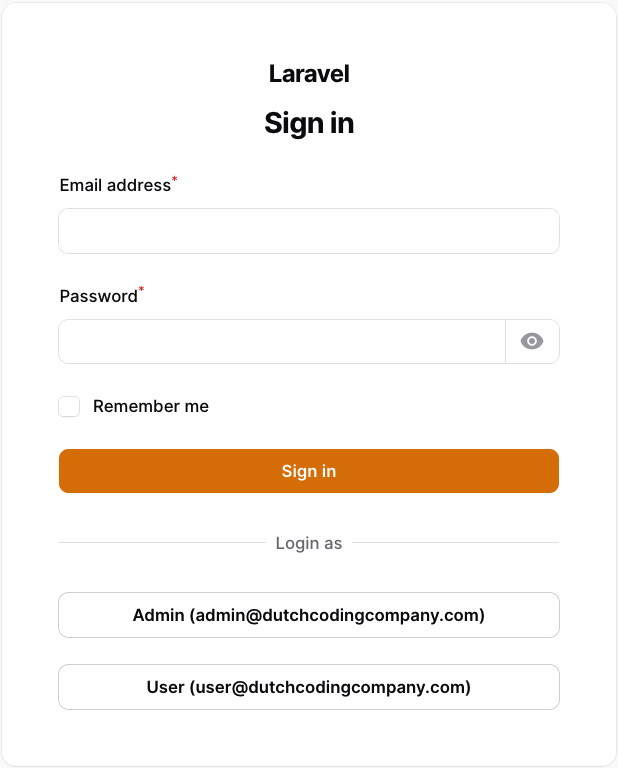
Add buttons to the login page of Filament to login as a specific user.
dutchcodingcompany/filament-developer-logins is a Laravel package for add buttons to the login page of filament to login as a specific user..
It currently has 64 GitHub stars and 344.711 downloads on Packagist (latest version 2.1.0).
Install it with composer require dutchcodingcompany/filament-developer-logins.
Discover more Laravel packages by dutchcodingcompany
or browse all Laravel packages to compare alternatives.
Last updated




This plugin allows you to enable one-click logins for your local Filament panels, which is useful when developing a Filament project with multiple users and various roles.
| Filament version | Package version | Readme | |---------------------------------------------------------------------------------------------------------------------------------------------------------------|-----------------|--------------------------------------------------------------------------------------| ^5.x | ^2.1.x | Link | | ^4.x | 2.x.x | Link | | ^3.x | 1.x.x | Link |
You can install the package via composer.
composer require dutchcodingcompany/filament-developer-logins
Register the plugin in the Filament panel provider (the default file is app/Providers/Filament/AdminPanelProvider.php).
In the users method you can define the users (note: the users must exist), the key is used as a label on the login button and the value is used to search the user in the database.
// ...
->plugins([
    FilamentDeveloperLoginsPlugin::make()
        ->enabled(app()->environment('local'))
        ->users([
            'Admin' => '[email protected]',
            'User' => '[email protected]',
        ])
]);
The users() method can also be passed a closure to compute the users list at render time, for example from the database.
// ...
FilamentDeveloperLoginsPlugin::make()
    ->users(fn () => User::pluck('email', 'name')->toArray())
]);
By default, the plugin is disabled. You can enable it by calling the enabled() method. I strongly suggest enabling this plugin only in the local environment. You can achieve this by using the app()->environment() method. Additionally, the enabled() method also accepts a closure if you wish to enable the plugin based on a custom condition.
Example:
// ...
FilamentDeveloperLoginsPlugin::make()
    ->enabled(fn() => app()->environment('local'))
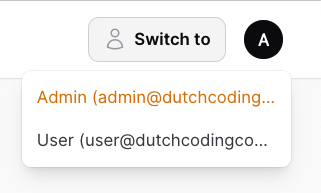
By default, a "Switch to" button is shown in the top right corner of the screen, so you can easily switch between the provided users. If you want to disable this feature, you can use the switchable() method.
// ...
FilamentDeveloperLoginsPlugin::make()
    ->switchable(false) // This also accepts a closure.
By default, the user column is set to email. If you want to use a different column, you can use the column() method.
Example:
FilamentDeveloperLoginsPlugin::make()
    ->column('name')
By default, the model class is set to App\Models\User. If you want to use a different model, you can use the modelClass() method.
Example:
FilamentDeveloperLoginsPlugin::make()
    ->modelClass(Admin::class)
By default, the user will be redirected using the Filament::getUrl() method, which directs them to the dashboard. In the case of multi-tenancy, the user will also be redirected to the correct tenant. If you prefer to use a different url, you can utilize the redirectTo() method.
FilamentDeveloperLoginsPlugin::make()
    ->redirectTo('/custom-url')
Since the routes are not yet registered when the plugin is created, you need to use a closure to redirect to a named route.
FilamentDeveloperLoginsPlugin::make()
    ->redirectTo(fn () => route('custom.route'))
composer test
Please see CHANGELOG for more information on what has changed recently.
Please see CONTRIBUTING for details.
Please review our security policy on how to report security vulnerabilities.
The MIT License (MIT). Please see License File for more information.