Package to easily add styling and icons into console outputs in laravel artisan commands
deerdama/console-zoo-laravel is a Laravel package for package to easily add styling and icons into console outputs in laravel artisan commands.
It currently has 6 GitHub stars and 4.082 downloads on Packagist (latest version v1.4.0).
Install it with composer require deerdama/console-zoo-laravel.
Discover more Laravel packages by deerdama
or browse all Laravel packages to compare alternatives.
Last updated
The purpose of this laravel package is to easily make console outputs less boring, and to be able to quickly style the content and add various icons at any time. Plus a couple more helpers like time and duration outputs, including laps splitting.
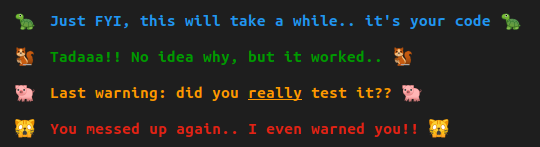
Methods with typical predefined formats are included: success, info, warning, error.




composer require deerdama/console-zoo-laravel
:grey_exclamation: Laravel versions: There shouldn't be any issues on >= 5.0 (confirmed on all versions from 5.X up to 12.X)
:exclamation: If you'll want to change some default parameters then you'll need to publish the config file:
php artisan vendor:publish --provider=Deerdama\\ConsoleZoo\\ConsoleZooServiceProvider
To see all the available colors and icons and to check how they'll look in your console you can run the artisan command
php artisan zoo:options
:grey_exclamation: Keep in mind that the icons/colors might not look exactly the same as the screenshots, and some might not even work for you, this depends on the console used (plus some other circumstances) and can't be controlled by the package itself. If you want to know more about the behind the scenes reason, and about the limitations, then you can find some info for example here... or just google it
All parameters are optional.
| Name | Description | Type |
|------------------------------------------|-------------------------------------------------------------------------------------------------------------------|---------------------------------|
| color ** | text color | string | int | array |
| background ** | background color | string | int | array |
| icons ** | icon/s to display | string | array | bool |
| icons_right ** | icon/s at the end of the message | string | array | bool |
| timestamp ** | adds timestamp in front of the output | bool |
| bold | increase text intensity |
| faint | decrease text intensity |
| italic | apply italic style to text
| underline | underline text |
| underline_double | double underline text |
| crossed | cross out the text |
| overline | add overline to text |
| blink | blink outputted text |
| swap | swap the text and background colors |
| category | this is for the random icon only | string |
| tz | available for the timestamp(); ** | string |
| format | available for the timestamp() and duration() ** | string |
| prepend_text | available for the lap()**. Can output the current lap number by adding {lap_number} | string |
| append_text | available for the lap()**. Can output the current lap number by adding {lap_number} | string |
class TestZoo extends Command
{
    use \Deerdama\ConsoleZoo\ConsoleZoo;

    //etc.......
}
You can pass the message and the parameters to all output methods. The second argument$parameters has to be an
array, but it's always optional, you can skip it completely if you want to. Check
the Available parameters section for more details.
The main flexible output method that you can use for any message is $this->zoo($messageString, $parameters), eg:
    $this->zoo("Let's take it slow...", [
        'color' => 'light_blue_bright_2',
        'icons' => ['turtle'],
        'bold',
        'italic',
    ]);

Other general methods can be found in the Defaults section. Plus the Inline usage section contains details about how to apply multiple styles within one message and add icons anywhere
Empty Line: to add some line breaks you can use $this->br();, this will simply output one empty line, if you
want a bigger gap, you can just pass the number of lines you want, eg. $this->br(4);
Surprise If you want to keep it random then you can use $this->surprise($messageString, $optionalParam)
category. $this->surprise("message", [
'category' => 'animals'
]);
Config: All the default styles and formats can be changed in
the configuration file
config\zoo.php. (The config file needs to be published!).
There are some default message types with pre-defined formats, that can be changed in the config or overwritten by passing parameters.
  $this->zooInfo($message, $optionalParam);
  $this->zooSuccess($message, $optionalParam);
  $this->zooWarning($message);
  $this->zooError($message);
$this->zooSetDefaults($parameters) at the beginning of your command without having to pass the same
parameters with every output.
info, error etc.., it will affect the
main $this->zoo() and the $this->surprise() methods only!! (Won't affect the icon of the latter). $this->zooSetDefaults([
'color' => 'cyan',
'icons' => 'wolf',
'bold'
]);
// And then..
$this->zoo("Meh, I'm just default..");

no_ in front of them. For example underline and bold can be cancelled
with no_underline, no_bold. $this->zoo("I'm the chosen one!!", [
'icons' => 'pig_face',
'swap',
'italic'
]);

['icons' => false], eg: $this->zooError("You are kind of boring..", [
'icons' => false
]);

timestamp parameter, $this->zooInfo("How about some sleep??", [
'timestamp' => true
]);

or it can be setup as default behaviour by changing the 'timestamp' => false to true in the published config
zoo.php.
In the config's time array you can also change the default timezone and the timestamp's format plus its output
style. Default timezone is the tz set in your config/app.php.
To just output the current time only, there is the time() function which accepts extra parameters to
overwrite the defaults, couple of examples..
    $this->time();
    $this->br();
    $this->time(['format' => 'H:i:s T', 'color' => 'blue']);
    $this->br();
    $this->time([
        'tz' => 'pst',
        'format' => 'jS \o\f F, Y H:i:s',
        'icons' => 'alarm_clock',
        'color' => 'green_bright_3'
    ]);

$this->duration();, but you need to start the timer
first!
to set the starting time call $this->start();. The duration has a default format and style that can be changed
in the config or passed as parameter in $this->duration($param), eg: $this->duration();
$this->duration([
'format' => 'Total duration %s.%f seconds',
'color' => 'pink_bright_2',
'icons' => 'snail'
]);
$this->duration([
'timestamp' => true,
'format' => '%i min and %s sec',
'icons' => false
]);

$this->lap();, the format and style of the output have the same
options as duration(),
plus two extra options prepend_text or append_text where you can add the current lap number through
{lap_number} (brackets included). zoo.php through the lap_duration attribute. $this->lap(false);. To overwrite the default styling/formatting
pass the parameters as second argument. $this->lap();
$this->lap(true, ['prepend_text' => 'Lap {lap_number} duration: ']);

Text and background colors can be changed through the color and background parameters.
There are multiple predefined colors that can be displayed through the artisan command. There
are all the basic colors and each of them has few lighter/darker/bright options. For example blue also
has blue_light_1, blue_dark_2, blue_bright_2 etc... Most colors fo up to xxx_light_4, xxx_dark_4
and xxx_bright_3
The colors can be passed in multiple ways:
['color' => 'red', 'background' => 'blue_dark_1']['color' => [255, 0, 0], 'background' => [0, 0, 255]]['color' => 1, 'background' => 4]\Deerdama\ConsoleZoo\Color directly ['color' => Color::RED, 'background' => Color::BLUE]Use the artisan command to see all the predefined colors...
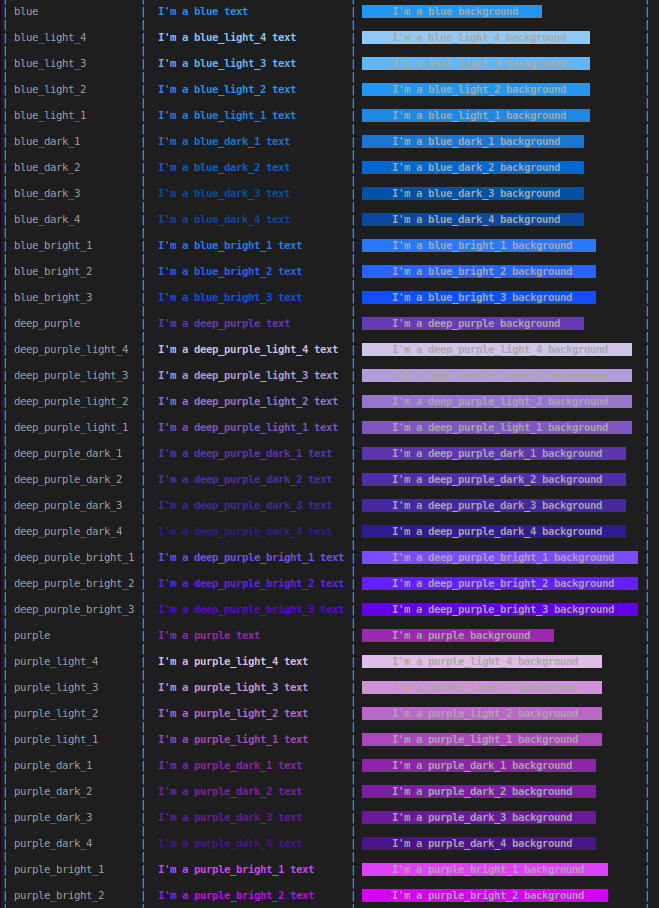
icons parameter as string or array for multiple icons $this->zoo("We want nuts...", [
'color' => 'teal_light_1',
'icons' => ['squirrel', 'squirrel', 'squirrel'],
'bold',
]);
As with the colors, you can use the \Deerdama\ConsoleZoo\Icon class constants directly
eg: ['icons' => Icon::SQUIRREL]
Passing parameter icons_right will add the specified icons to the end of the message
To add different icons to the end of the default outputs (success, error, etc..), pass or add to the
config ['icons_right' => {icon/s}].
To have icons only at the start of the default messages pass or setup in the config ['icons_right' => false]
    $this->zooInfo("Tutturuuu...", ['icons_right' => 'dog']);

    $this->zooInfo("Tutturuuu...", ['icons_right' => false]);

utf-8 code of whatever icon you need,
eg ['icons' => "\xF0\x9F\x90\xBF\xEF\xB8\x8F"] (Still a squirrel). The raw utf-8 icon must
be inside double quotesThere are over 700 predefined icons, Use the artisan command to display all the available icons... (Tip: You can filter by category if you choose the option to show "icons" only)

and so on...
<zoo {PARAMETERS}></zoo> tag
    $this->zoo("Main style <zoo color='magenta' italic>inline style</zoo>, main again <zoo swap bold> 2nd inline </zoo>...
                <zoo color='pink_bright_2' underline bold>it's not rocket science..</zoo> ", [
        'icons' => ['baby_chick'],
        'color' => 'blue'
    ]);
<icon>{icon}</icon> tag.
    $this->zoo("I'm actually a fluffy <icon>unicorn</icon>, really!!! <icon>face_with_sunglasses</icon>", [
        'color' => 'pink_bright_2',
        'icons' => ['horse'],
        'bold'
    ]);



