A Laravel Nova card for displaying lists with links to view and edit
abordage/nova-table-card is a Laravel package for a laravel nova card for displaying lists with links to view and edit.
It currently has 13 GitHub stars and 44.520 downloads on Packagist (latest version 1.0.0).
Install it with composer require abordage/nova-table-card.
Discover more Laravel packages by abordage
or browse all Laravel packages to compare alternatives.
Last updated
A Laravel Nova card for displaying lists with links to view and edit.
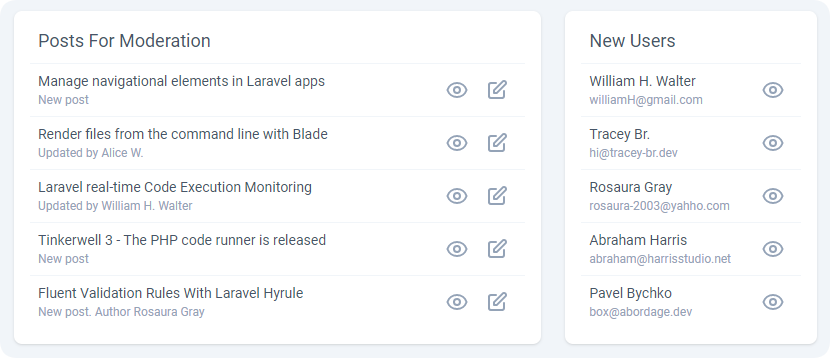





You can install the package via composer:
composer require abordage/nova-table-card
To create a cards use the artisan command:
php artisan nova-table-card MyTableCard
By default, all new cards will be placed in the app/Nova/Cards directory.
Once your table card class has been generated, you're ready to customize it:
<?php

namespace App\Nova\Cards;

use Abordage\TableCard\TableCard;

class MyTableCard extends TableCard
{
    /**
     * Name of the card.
     */
    public string $title = 'My Table Card';

    /**
     * The width of the card (1/2, 1/3, 1/4 or full).
     */
    public $width = '1/3';

    /**
     * Array of table rows
     *
     * Required keys: title, viewUrl
     * Optional keys: subtitle, editUrl
     */
    public function rows(): array
    {
        $rows = [];

        /** for example */
        $models = \App\Models\User::limit(5)->get();
        foreach ($models as $model) {
            $rows[] = [
                'title' => $model->name,
                'subtitle' => $model->email,
                'cssClasses' => ['text-red-500'],
                'viewUrl' => $this->getResourceUrl($model),
                'editUrl' => $this->getResourceUrl($model) . '/edit',
            ];
        }

        return $rows;
    }
}
Once you have defined a card, you are ready to attach it to a dashboard or resource. You should simply add it to the array of cards.
If you have any feedback, comments or suggestions, please feel free to open an issue within this repository.
The MIT License (MIT). Please see License File for more information.